Start sending with Mailtrap SMTP service in minutes
Deliverability-first SMTP provider that 150K+ developers trust. 24/7 expert support.
 Get Started
 -
 Node.js
-
 PHP
PHP
-
 Laravel
-
 Python
-
 Java
Java
-
 RoR
RoR
-
 cURL
cURL
Node.js.txt
Copy
var transport = nodemailer.createTransport({
  host: "live.smtp.mailtrap.io",
  port: 587,
  auth: {
    user: "api",
    pass: "<YOUR_API_TOKEN>"
  }
});

transport.sendMail({
  from: "Private Person <hello@am3.elcastorcillo.com>",
  to: "A Test User <demo@mailtrap.io>",
  subject: "Hello from Mailtrap",
  text: "This is a test e-mail message."
}, (error, info) => {
  if (error) {
    return console.log(error);
  }
  console.log("Message sent: %s", info.messageId);
});Powering email infrastructure for teams






Mailtrap SMTP service features for reliable sending

Ready-to-use code snippets

Email logs & body retention

Email authentication

Webhooks

Dedicated IPs

Auto IP warm-up
Connect Mailtrap with the tools your team already use
Native support for modern dev tools and AI coding assistants.

Supabase

Vercel

Claude Code

Mailtrap MCP Server

Cursor

Google Antigravity
SMTP relay service for products focused on high deliverability

SaaS
Send onboarding flows, billing notifications, and feature updates.

FinTech
Send transaction confirmations, security alerts, and market updates.

Travel & Hospitality
Send booking confirmations, payment receipts, and promotional offers.

EdTech
Send welcome emails, feedback requests, and progress updates.






Compliant SMTP provider



Mailtrap SMTP service pricing plans
High deliverability with every plan. Upgrade for dedicated IPs, extended logs, and priority support.
Free
- 150 emails/day
- 1 sending domain
- 3 days log retention
Basic
Basic
Basic
- All Free plan features
- No daily sending limits
- 5 days log retention
Business
Business
Business
Business
- All Basic plan features
- Dedicated IPs
- 15 days log retention
Enterprise
Enterprise
- All Business plan features
- Priority support
- Custom contracts & enterprise billing
Free
0
- 150 emails/day
- 1 sending domain
- 3 days log retention
Basic
Basic
Basic
15
20
30
- All Free plan features
- No daily sending limits
- 5 days log retention
Business
Business
Business
Business
85
200
300
450
- All Basic plan features
- Dedicated IPs
- 15 days log retention
Enterprise
Enterprise
750
1.250
- All Business plan features
- Priority support
- Custom contracts & enterprise billing
- API & SMTP
- Official SDKs
- Inbound Email
- Industry-best Analytics
- Webhooks
- Dedicated IPs




Frequently Asked Questions
-
What are Mailtrap SMTP rate limits?
Mailtrap enforces a general rate limit of 150 requests per 10 seconds per API token. SMTP sending throughput depends on your plan tier and sending patterns. For optimal performance, distribute sends evenly rather than sending in bursts, and implement retry logic with exponential backoff if you encounter temporary failures. Detailed rate limits are documented in the Mailtrap docs.
-
How does Mailtrap handle bounces and suppression lists?
Hard bounces are added to a global suppression list immediately and are not retried. Spam complaints received via feedback loops are suppressed across all streams automatically. You can view and manage suppressions directly in the dashboard or via the API.
-
Does Mailtrap SMTP support sending from multiple domains?
Yes. You can add and verify multiple sending domains within a single account. Each domain requires independent DNS verification before sending. Unsubscribes are domain-specific, so a recipient unsubscribing from one domain does not affect sending from your other verified domains.
-
Can I use SMTP and the API on the same account?
Yes. Both methods share the same sending infrastructure, IP pools, and deliverability setup. You can switch between them or use both simultaneously without any additional configuration.
-
How does migrating from another SMTP provider work?
Mailtrap provides dedicated migration support including DNS transition guidance, IP warm-up planning, and deliverability monitoring during the switch. Step-by-step migration guides are available for SendGrid, Mailgun, Postmark, Amazon SES, Brevo, and Mailchimp Transactional.
The Engineer's Guide to Choosing an SMTP Service

Soon, SMTP is turning 44. RFC 821 was published in August 1982, and the protocol has outlasted every proprietary alternative that tried to replace it.
In fact, it carries more email today than it did a decade ago, and for a good reason.
You configure your application with SMTP credentials – host, port, username, password – and the provider manages IP addresses, DNS resolution, retry logic, deliverability, and sender reputation. The Simple Mail Transfer Protocol does the rest.
This guide covers what to evaluate when choosing a provider – from the SMTP connection itself to the infrastructure behind it.
Why SMTP still runs email
SMTP persists for three reasons that haven’t changed in four decades.
- Universal federation. Any SMTP server can send to any other SMTP server without a prior relationship, shared platform, or vendor agreement. This is the fundamental property that no API-based service can replicate at the protocol level.
- Framework-native support. Every major language and framework ships with SMTP support built in. Python has
smtplibin the standard library, Ruby has Action Mailer. PHP has PHPMailer, and so on. You don’t need to install a provider-specific SDK or learn a proprietary API to send emails. - The extension mechanism works. ESMTP (RFC 1869, 1995) introduced the EHLO command and a way to bolt on new capabilities without breaking backward compatibility. Authentication (RFC 2554), pipelining (RFC 2920), STARTTLS – all extensions. As recently as February 2024, the LIMITS extension (RFC 9422) landed, letting servers advertise recipient maximums during the handshake. Simply, the protocol evolves without breaking.
For context, developer teams choose SMTP because they need the widest possible integration compatibility – e.g. when they’re connecting legacy systems or CMS platforms like WordPress, or when they want to avoid coupling their email sending to a single vendor’s SDK.
It’s also the path of least resistance when your email volume doesn’t justify learning a provider-specific API for what is, at its core, putting a message in a mailbox.
The SMTP connection: ports, TLS, and the handshake
Port selection is a real engineering decision with SMTP – not a default you accept and forget. The port you choose affects security, compatibility, and whether your emails leave your infrastructure at all. Choose wrong, and your application talks to a firewall instead of a mail server.
Port guide
- Port 587 – The standard submission port (RFC 6409). Your application opens a plaintext TCP connection, the server advertises STARTTLS in its EHLO response, and the connection upgrades to TLS before authentication. This is the most widely supported option.
- Port 465 – Implicit TLS. The TLS handshake happens immediately on connection – no plaintext phase, no upgrade. RFC 8314 (2018) officially re-sanctioned this port and recommends it over 587 for new implementations, because STARTTLS is vulnerable to downgrade attacks where a man-in-the-middle strips the TLS advertisement.
- Port 2525 – An unofficial alternative for environments where 587 is blocked. Common with cloud providers. Not standardized, but widely supported by SMTP services.
- Port 25 – The original SMTP relay port, meant for server-to-server mail transfer, not application submission. It’s effectively dead for application use. AWS blocks outbound port 25 on all EC2 instances and Lambda functions. GCP blocks it at the network level. Azure blocks it on VMs and PaaS resources. DigitalOcean goes furthest – blocking ports 25, 465, and 587 on all new Droplets by default. If you’re building on cloud infrastructure and your SMTP sending plan depends on port 25, your plan has a hole in it.
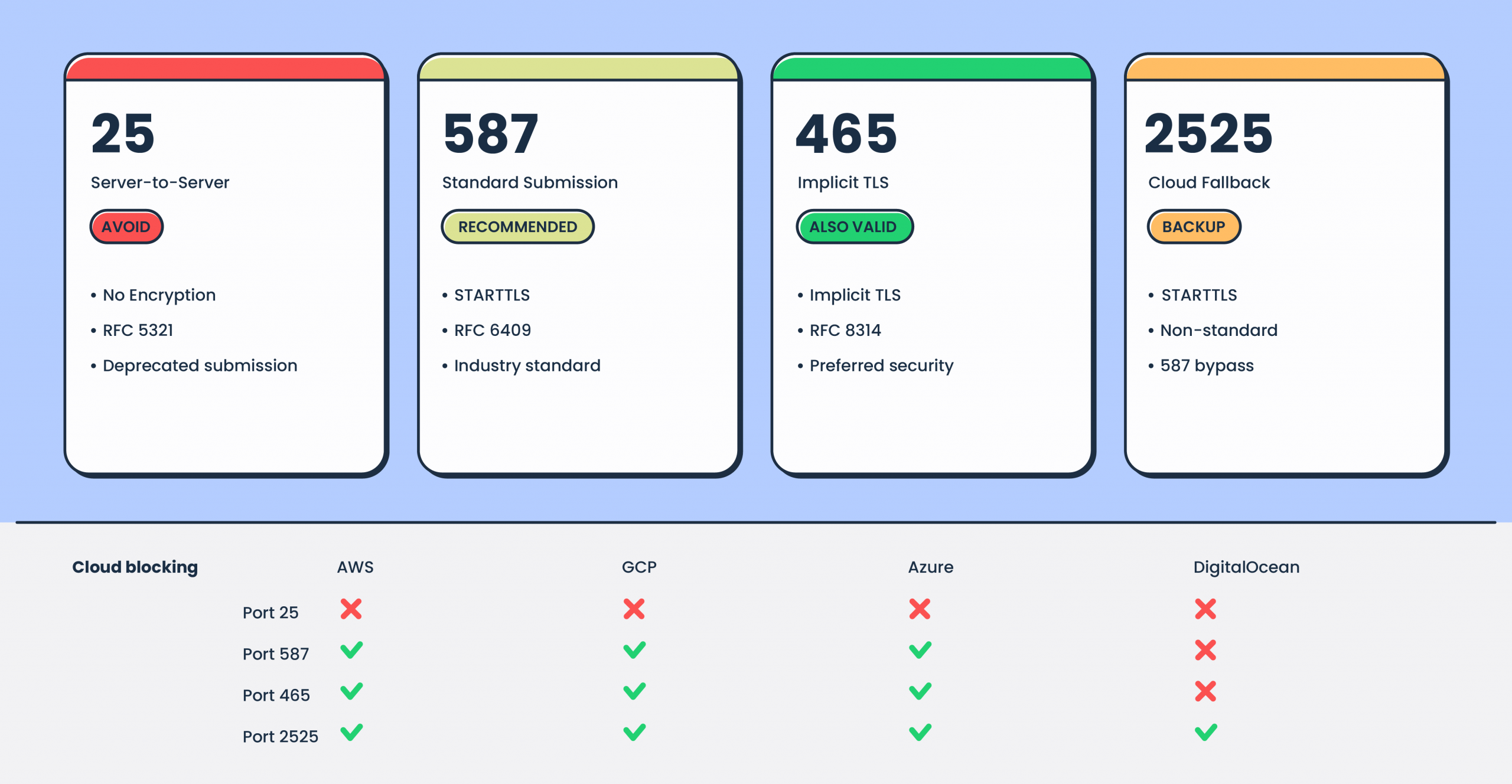
Check for:
- TLS enforcement – Does the provider require TLS, or is it optional? TLS should be mandatory. Require TLS 1.2+ minimum – versions 1.0 and 1.1 are deprecated.
- Certificate validation – Does the provider present a valid certificate? Can you enforce strict validation on your side?
- Port availability – Confirm the provider supports your required port. If you’re deploying on cloud infrastructure, 587 or 2525 are your realistic options.
What happens during the connection
An SMTP transaction is a multi-step conversation between your application and the server. Understanding the sequence helps you diagnose problems and evaluate provider performance.
With STARTTLS on port 587, the sequence is:
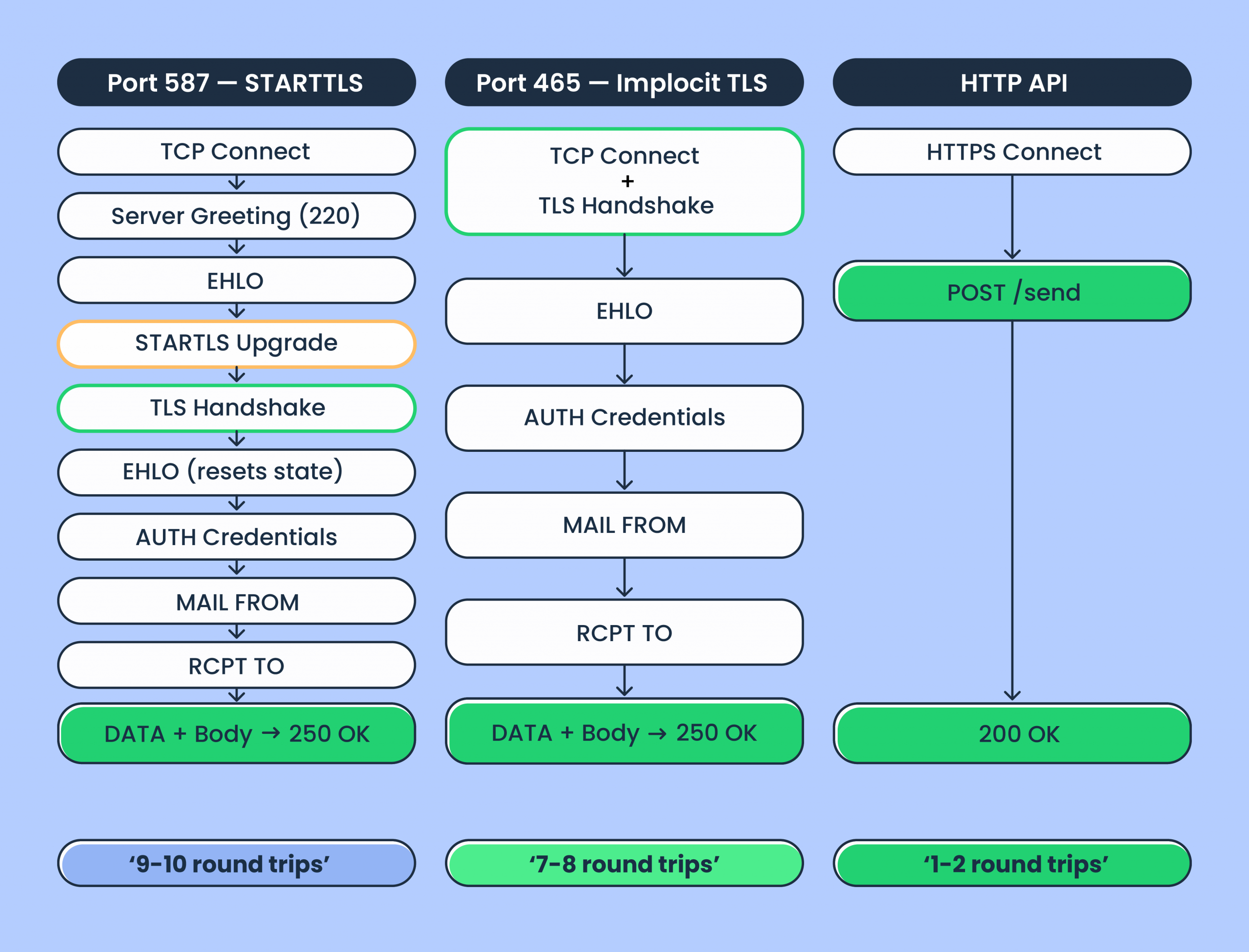
That’s 9-10 round trips for a single message to a single recipient. Your email introduces itself, proves its identity, gets permission to speak, and then finally says what it came to say.
With implicit TLS on port 465, you skip the plaintext phase and the STARTTLS upgrade – saving 2 round trips. The TLS handshake happens at connection time, and you go straight to EHLO on the encrypted channel.
For comparison, an HTTP API sends the same email in 1-2 round trips via a single POST request. The protocol overhead difference is why high-volume senders often prefer API for programmatic sending.
But with SMTP connection pooling – reusing persistent connections across multiple messages via RSET commands instead of reconnecting each time – the per-message overhead drops significantly.
Check for:
- SMTP pipelining support – RFC 2920 allows batching commands (MAIL FROM, RCPT TO) without waiting for individual responses. This reduces round trips on pooled connections.
- Connection pooling guidance – Does the provider document recommended concurrent connection counts and pooling behavior?
SMTP credentials and authentication
SMTP AUTH typically uses a username and password pair over a TLS-encrypted connection. How providers generate these credentials varies.
Some providers use your account API key as the SMTP password (SendGrid uses “apikey” as the literal username with the API key as the password). Others generate separate credentials. Amazon SES derives its SMTP password from IAM credentials through a specific algorithm – it’s not the IAM access key itself. And this trips up at least one developer per Stack Overflow week.
Check for:
- Credential scoping – Can you create credentials with limited permissions or per-domain isolation?
- Credential rotation – Is there a process for rotating credentials without downtime?
- IP whitelisting – Can you restrict SMTP access to specific IP ranges?
Deliverability infrastructure
Getting your email out the door is the SMTP connection’s job. Getting it into the inbox is the infrastructure’s job. IP reputation, email authentication, stream separation, and failure handling are what separate inbox placement from spam.
For a deeper dive, see our guide on inbox placement, but here, I’m touching upon what makes the infrastructure tick all the right boxes.
IP setup
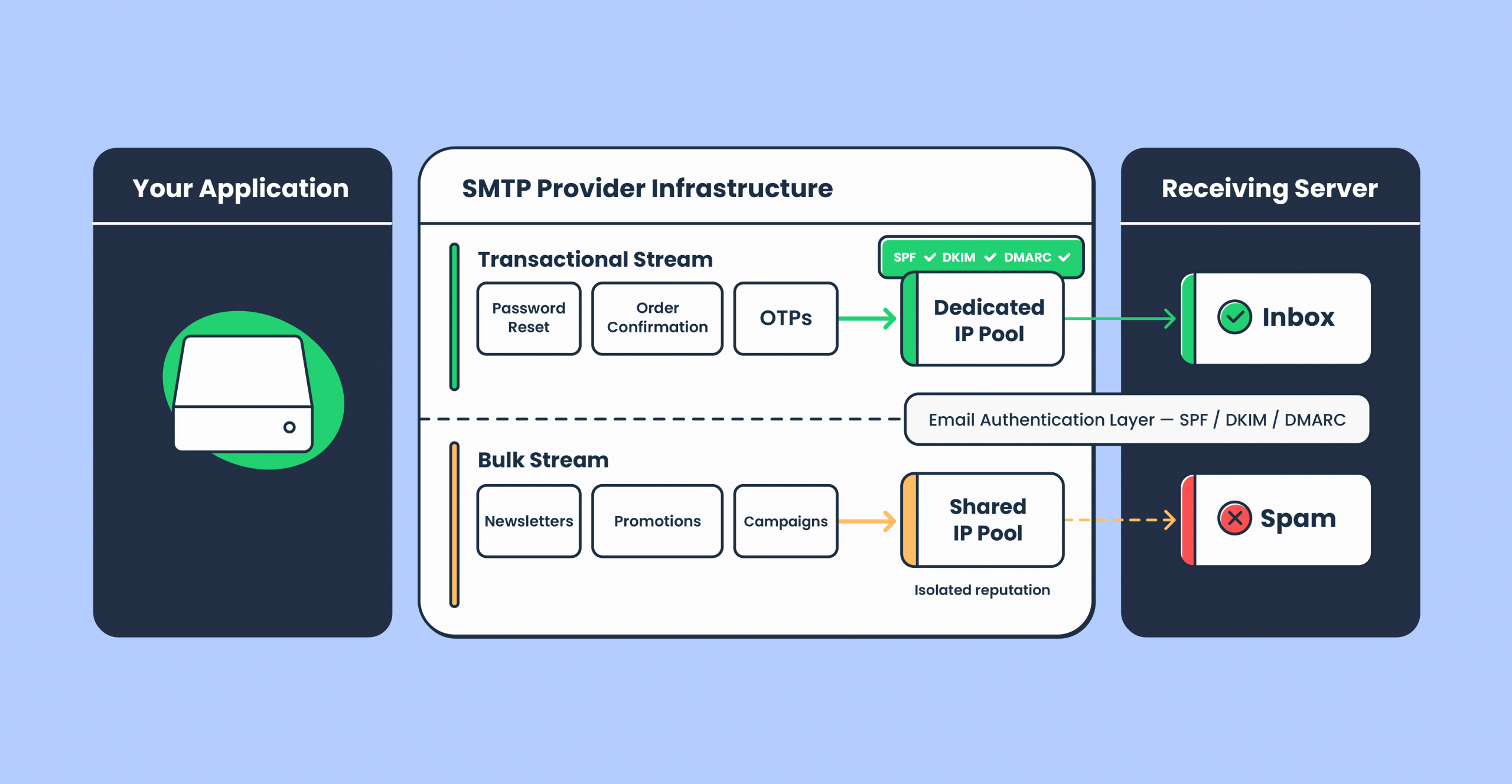
Shared IPs pool your sender reputation with other senders on the same server. If someone in the pool sends spam, your reputation suffers – it’s like sharing a credit score with strangers. That said, shared IPs work fine for volumes under ~100K emails per month. The question is whether the SMTP provider actively monitors pool health and removes bad actors fast.
Dedicated IPs give you full control over your reputation. But there’s a trade-off: they require warm-up, gradually increasing email volume so ISPs build trust in the new IP address. Doing this manually is tedious and error-prone. Look for providers that offer automatic IP warm-up with load balancing.
Check for:
- Dedicated IP availability – Some providers restrict dedicated IPs to enterprise tiers. Mailtrap offers them on the Business plan starting at 100K/month with automatic warm-up.
- Warm-up process – Automatic, manual, or both? Automatic warm-up with load balancing reduces the risk of burning a new IP.
Mailtrap offers dedicated deliverability experts starting from the Business plan to assist with scaling and volume transitions. One caveat: if you need dedicated IPs at lower volumes (under 100K/month), you’ll need to look at providers that offer them on lower tiers – Mailtrap gates dedicated IPs to the Business plan.
Authentication: SPF, DKIM, DMARC
SPF, DKIM, and DMARC are required for email delivery. Skip any of the three and you’re asking Gmail to trust you on faith. Review the provider’s domain verification process before signing up – you should get all required DNS records upfront.
After Google and Yahoo’s 2024 sender requirements tightened the enforcement of DKIM and DMARC, these aren’t optional for any sender at any volume.
Look deeper:
- DKIM key rotation – Is it automatic? Mailtrap rotates DKIM keys monthly by default.
- Custom return-path – This determines SPF alignment and directly affects inbox placement.
Sending streams
If you send both transactional emails (password resets, order confirmations, security alerts) and bulk emails (newsletters, promotions), verify they’re routed through separate infrastructure. Bulk campaigns carry higher complaint risk. Mixing them with transactional traffic is how your password reset emails end up in spam because marketing sent a promotion that annoyed 2% of your list.
Check for:
- Stream separation – Mailtrap separates transactional and bulk into distinct streams with isolated reputation.
- Queue priority – Time-sensitive notifications (OTP, security alerts) shouldn’t sit behind a marketing campaign. Ask how the provider prevents large bulk sends from delaying transactional traffic.
Delivery failure handling
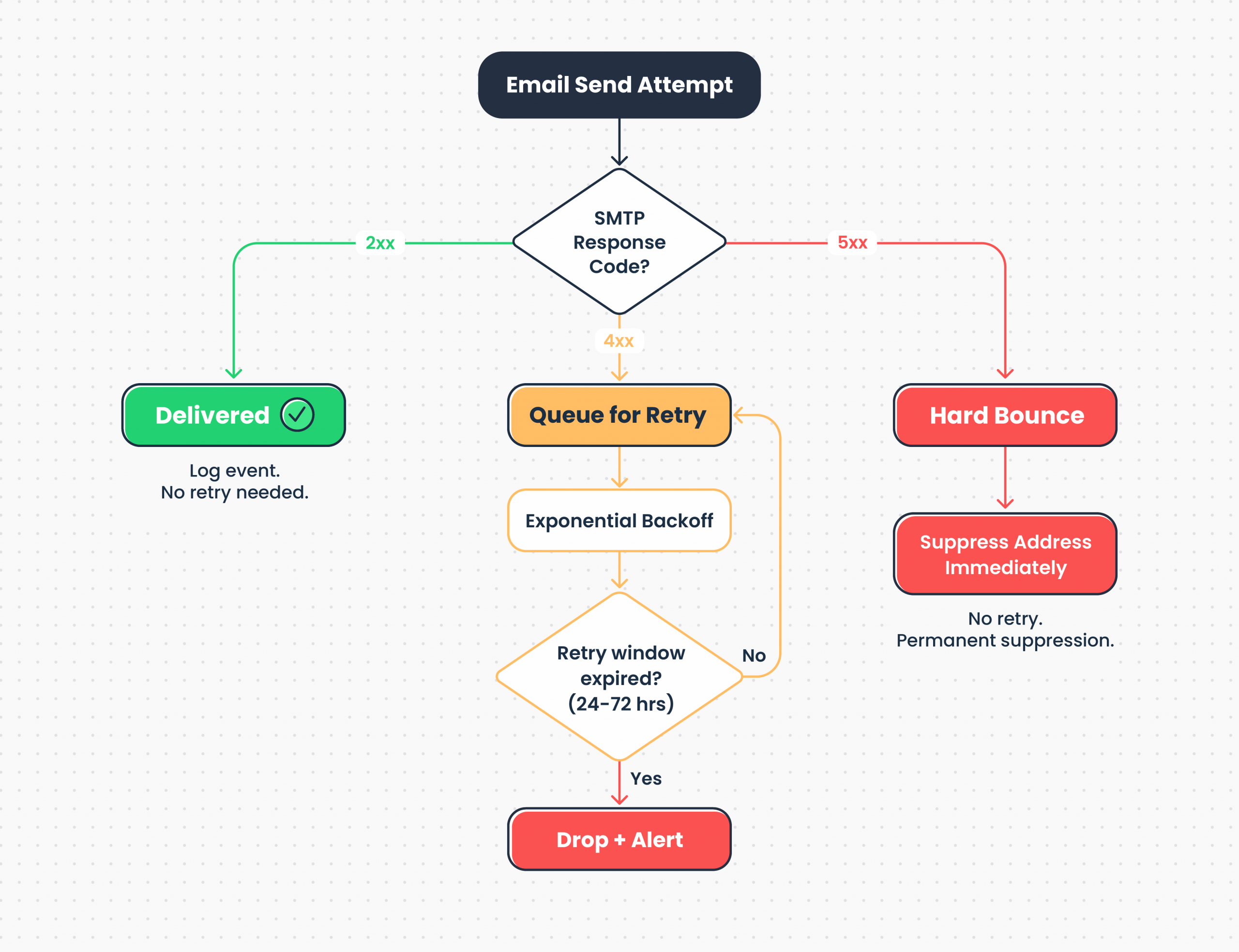
SMTP response codes tell you exactly what went wrong. Of course, this goes assuming the provider surfaces them properly. For instance – a 421 is the receiving server saying “try again later,” and a 550 is “don’t come back.” The difference matters for how your sending service handles each case.
Check for:
- Retry logic – Temporary failures (4xx SMTP codes) should be retried with exponential backoff. Providers that hammer the receiving server after a 421 are doing you no favors.
- Retry window – 24-72 hours is the target. Too short and you drop messages during transient outages. Too long and failed addresses clog the queue.
- Hard bounce handling – Permanent failures (5xx codes) should immediately suppress the address. No retries, no exceptions.
- Feedback loop processing – Spam complaints via ISP feedback loops should trigger immediate suppression across all streams.
Blocklist monitoring
Getting listed on Spamhaus, Barracuda, or SpamCop can crater deliverability overnight. What matters is whether the provider monitors proactively and alerts you before the damage spreads.
Postmark, for example, maintains tight IP pool controls and removes bad senders aggressively. Mailtrap includes proactive blocklist monitoring with deliverability alerts as part of its infrastructure.
Either way, ask how the provider handles blocklist incidents – you want to know before it happens, not after Gmail starts bouncing your transactional emails.
Scaling SMTP: throughput, connections, and throttling
Your application sends 500 emails a day until the day it sends 50,000. How your provider handles that jump (without your PagerDuty going off at 3 AM) depends on connection limits, sending rates, and throttling behavior.
Connection and rate limits
SMTP has two distinct bottlenecks, and providers enforce limits on both.
Inspect:
- Connection limits – Maximum concurrent SMTP connections your account can maintain. This matters if you’re sending emails from multiple application servers simultaneously. For reference, Microsoft Exchange Online limits authenticated submission to 3 concurrent connections per account. Postmark and Mailgun, on the other hand, scale connection limits with account reputation and plan tier.
- Sending rate limits – Emails per second or per minute the server actually delivers – this is the real throughput ceiling. Amazon SES starts new production accounts at 14 emails per second – if you need more, you request an increase. Gmail limits inbound from a single source too, so even high deliverability providers can’t bypass recipient-side throttling.
Mailtrap documents rate limits transparently per plan.
Throttling
Email throttling controls the rate of outbound traffic to recipient mail servers. Without it, sending too fast triggers rate limiting on the receiving end – and that damages your inbox placement.
Check:
- Whether throttling is automatic or configurable.
- Whether you can set per-domain throttling for sensitive recipients (enterprise clients with strict receiving policies).
- How the provider handles ISP-imposed throttling – queue and retry, or drop?
This is especially critical for email marketing campaigns where reputation is everything.
Batch sending via SMTP
SMTP handles multiple recipients natively through multiple RCPT TO commands in a single transaction. After MAIL FROM, you issue one RCPT TO per recipient, then send the DATA once. The server delivers to all accepted recipients from a single message transfer.
RFC 5321 requires servers to accept at least 100 RCPT TO commands per transaction. The newer LIMITS extension (RFC 9422, February 2024) lets servers advertise their actual maximum via RCPTMAX during the EHLO handshake – so your application can adapt without trial and error.
The trade-off: multiple RCPT TO sends the same message body to all recipients (no per-recipient personalization). For personalized transactional emails, you need separate transactions.
Check for:
- Maximum recipients per SMTP transaction.
- Whether batch sends are processed in parallel or serialized.
- Rate limits specific to bulk vs. transactional streams.
Integration and time to first send
SMTP’s biggest integration advantage is that you barely need one. Swap the host and credentials, and you’ve switched providers.
As mentioned, any language or framework that speaks the SMTP protocol works out of the box – no provider-specific SDK, no additional libraries, no API versioning to track. This is also what makes SMTP for developers a low-friction starting point compared to a proprietary API.
Framework compatibility
- Node.js – Nodemailer (with pooled connection support)
- Python – smtplib (standard library)
- PHP – PHPMailer, Symfony Mailer, Laravel Mail
- Ruby – Action Mailer (Rails), Mail gem
- Java – Jakarta Mail (formerly JavaMail)
- .NET – System.Net.Mail, MailKit
- Go – net/smtp (standard library)
Check:
- Whether the provider requires proprietary libraries or custom headers. Standard SMTP credentials should be all you need.
- Whether the provider also offers an email API for use cases where programmatic control beats SMTP.
Mailtrap supports both SMTP and Email API on every plan.
Time to first send
How fast you go from signup to a delivered email tells you more about a provider than their feature page does.
Check:
- Account verification – Instant, email confirmation, or manual approval?
- Domain verification – Does the provider give you all DNS records upfront (SPF, DKIM, DMARC)? How clearly is the process documented?
- Credentials – Available immediately after domain verification, or is there an additional wait?
- Test sending – Can you send a test email within minutes of SMTP configuration?
Tip: Check if the provider supports a sandbox environment before you go to production. Inspecting sent emails, verifying HTML email rendering, and running spam checks before hitting real inboxes saves hours of debugging.
Mailtrap provides quickstart guides with copy-paste SMTP configuration for all supported languages and a complete API reference with documented error codes.
Logs, analytics, and webhooks
When email delivery breaks (and, at scale, it’s a question of when, not if) logs and analytics are what keeps you from guessing.
What to check
- Log retention – Ranges from 3 to 30+ days depending on provider and plan. Mailtrap retains email logs for up to 30 days on higher tiers, including full body content with HTML preview and spam analysis.
- Delivery analytics – Core metrics (delivery rate, bounce rates, open rates, click rate, spam complaint rate) with segmentation by domain and time period. Gmail, Outlook, and Yahoo all filter differently – your aggregate numbers hide problems that domain-level breakdowns expose.
- Webhooks – Real-time event notifications (delivered, bounced, opened, clicked, unsubscribe, spam complaint) pushed to your systems. Check for retry logic when your endpoint is down and webhook signature verification for security.
Mailtrap provides actionable analytics with domain-level insights and supports webhooks for all major events with documented payloads.
SMTP relay service pricing? Cost?
SMTP service costs are typically a rounding error compared to compute, database, and monitoring infrastructure. If you’re spending more time optimizing your email bill than your inbox placement, the priorities are inverted.
Common pricing models:
- Tiered/monthly – Cost-effective if you consistently hit the tier. An $85/month tier for 100K emails is $0.00085/email – but only if you send 100K.
- Per-email – Predictable at steady volume. Costs scale linearly.
- Pay-as-you-go – Flexible, but often higher per-email cost.
Watch for:
- Overage handling – Does sending stop at the limit (hard cap, which can silently break production), or continue at overage rates? Does the provider alert you before you hit the ceiling?
- Feature gating – Dedicated IPs, priority support, advanced analytics locked behind higher tiers. Calculate total cost of ownership, not just the per-email number.
- Vendor coupling – Proprietary SMTP configurations or non-standard behaviors that increase switching cost. SMTP’s standardization is supposed to make providers interchangeable – check if that holds true in practice.
Compliance and security
Check certifications and access controls early. A secure SMTP service isn’t just about TLS on the connection – it’s about the entire security posture of the provider. Compliance gaps discovered after integration mean rework.
Certifications
- SOC 2 Type II – Audited controls for security, availability, and confidentiality. Required by most enterprise procurement teams.
- ISO 27001 – International standard for information security management.
- HIPAA – Required for protected health information. Requires a Business Associate Agreement (BAA).
Ask for documentation upfront. “We’re SOC 2 compliant” means nothing without the audit report. Mailtrap is ISO 27001 certified and SOC 2 compliant – documentation available at Trust Center.
SMTP-specific security
Beyond standard certifications, SMTP has its own security considerations.
- TLS enforcement on delivery – Does the SMTP server enforce or attempt TLS when delivering to recipient servers? Opportunistic TLS is standard; enforced TLS is stricter but may cause failures to misconfigured recipients.
- MTA-STS support – Prevents TLS downgrade attacks by publishing a policy that tells sending servers to require TLS for your domain. Adoption is still below 1% globally but growing.
- DANE support – A stronger alternative to MTA-STS that uses DNSSEC-authenticated DNS records to specify expected TLS certificates. Harder to deploy (requires DNSSEC), but eliminates trust-on-first-use vulnerabilities. Adoption around 14% in markets with government mandates (Netherlands), lower globally.
Regulatory compliance
- GDPR – Applies if you have EU users. Requires DPA, data subject rights support, and breach notification.
- CAN-SPAM – US email law. Requires unsubscribe mechanism, physical address, and honest headers.
- CCPA – California privacy law. Requires disclosure and opt-out mechanisms.
Access controls
- SMTP credential scoping – Can you create credentials with limited permissions or per-domain isolation?
- Role-based access (RBAC) – Different permission levels for team members.
- MFA – Multi-factor authentication for dashboard access.
- IP whitelisting – Restrict SMTP access to specific IP ranges.
Support and switching providers
Support channels
- Channels – Email/ticket, live chat, or phone?
- Availability – Business hours or 24/7? Which timezone?
- Response time SLAs – Guaranteed first response time? Does it vary by severity?
- Tier gating – Priority support included, or locked to enterprise plans?
Mailtrap offers 24/7 support from the email deliverability team with priority response starting from the Business plan.
Migration
Switching SMTP relay providers involves DNS changes, IP warm-up, reputation building, and potential inbox placement dips during transition. The good news: SMTP’s standardization means your application code rarely needs to change. You update the host, port, and credentials. The infrastructure underneath – that’s where the careful handling happens.
Check for:
- Dedicated migration assistance – A team or process for customers switching SMTP providers.
- DNS transition guidance – Help with SPF, DKIM, DMARC cutover to avoid gaps in email verification.
- Warm-up planning – Tailored warm-up plan for your email volume on new dedicated IPs.
- Parallel sending support – Can you run old and new SMTP provider simultaneously during transition?
Mailtrap offers migration support including DNS guidance, warm-up planning, and deliverability monitoring, with step-by-step tutorials:
- from SendGrid
- from Mailgun
- from Amazon SES
- from Postmark
- from Brevo
- from Mailchimp Transactional Emails
Wrapping up
SMTP is a 43-year-old protocol that runs modern email because it got the fundamentals right: universal federation, extensibility without breaking changes, and a simplicity that makes it debuggable with a telnet session. Not many protocols from 1982 can say that. Most of them are in museums.
The SMTP integration itself is the easy part – credentials in, emails out. What determines whether those emails reach the inbox is the infrastructure behind it: IP reputation, stream separation, retry logic, and monitoring.
Quick reminder: evaluate across layers, including
- The connection – Port support, TLS enforcement, credential management.
- Infrastructure – Dedicated IPs, warm-up, SPF/DKIM/DMARC, sending streams, bounce handling, blocklist monitoring.
- Scalability – Connection limits, sending rates, throttling, batch support.
- Integration – Framework compatibility, time to first send, documentation.
- Operations – Log retention, delivery analytics, webhook coverage.
- Cost – Total cost of ownership. Factor in feature gating and engineering time.
- Compliance – Certifications, SMTP security (MTA-STS, DANE), access controls.
Configure the SMTP server, send test emails, trigger errors intentionally, and inspect logs. The SMTP protocol makes this easy – you can literally watch the conversation between your application and the server. That transparency is one of SMTP’s oldest and most underrated advantages.
Start sending with Mailtrap SMTP
Useful links:
Step-by-step SMTP tutorials: