Skip to Navigation
Start sending with Mailtrap Email API in minutes
Deliverability-first email API that 150K+ developers trust. 24/7 expert support.
 Get Started
 -
 Node.js
-
 PHP
PHP
-
 Python
-
 Ruby
Ruby
-
 .NET
.NET
-
 Java
Java
-
 cURL
cURL
Node.js.txt
Copy
import { MailtrapClient } from "mailtrap";

const client = new MailtrapClient({
  token: process.env.MAILTRAP_API_KEY,
});

async function sendEmail() {
  await client.send({
    from: {
      email: "sender@example.com",
      name: "Sender Name"
    },
    to: [{ email: "recipient@example.com" }],
    subject: "Hello from Mailtrap",
    text: "Welcome to Mailtrap!",
    html: "<h1>Welcome to Mailtrap!</h1>"
  });
}

sendEmail();Powering email infrastructure for teams






Email API with an endpoint for every workflow
RESTful endpoints to send transactional and bulk emails, to manage templates, suppressions, your account and get delivery statistics – all from a single, well-documented API.
-

/send
Send transactional emails
-
/bulk
Send promotional emails
-
/templates
Create and manage email templates
-
/stats
Track delivery, open, click, and bounce rates
-
/suppressions
Manage bounces and unsubscribes


Copy
import { MailtrapClient } from "mailtrap";

const client = new MailtrapClient({
  token: process.env.MAILTRAP_API_KEY,
});

async function sendEmail() {
  await client.send({
    from: {
      email: "sender@example.com",
      name: "Sender Name"
    },
    to: [{ email: "recipient@example.com" }],
    subject: "Hello from Mailtrap",
    text: "Welcome to Mailtrap!",
    html: "<h1>Welcome to Mailtrap!</h1>"
  });
}

sendEmail();Connect Mailtrap with the tools your team already use
Integrate email API into your stack: native support for modern dev tools and AI coding assistants.

Supabase

Vercel

Claude Code

Mailtrap MCP Server

Cursor

Google Antigravity
Email API service for products focused on high deliverability

SaaS
Send onboarding flows, billing notifications, and feature updates.

FinTech
Send transaction confirmations, security alerts, and market updates.

Travel & Hospitality
Send booking confirmations, payment receipts, and promotional offers.

EdTech
Send welcome emails, feedback requests, and progress updates.






Mailtrap Email API features for reliable sending

Actively maintained SDKs

Email logs & body retention

Email authentication

Webhooks

Dedicated IPs

Auto IP warm-up
Compliant email API



Mailtrap Email API pricing plans
High deliverability with every plan. Upgrade for dedicated IPs, extended logs, and priority support.
Free
- 150 emails/day
- 1 sending domain
- 3 days log retention
Basic 10K
Basic 50K
Basic 100K
- All Free plan features
- No daily sending limits
- 5 days log retention
Business 100K
Business 250K
Business 500K
Business 750K
- All Basic plan features
- Dedicated IPs
- 15 days log retention
Enterprise 1,5M
Enterprise 2,5M
- All Business plan features
- Custom deliverability assistance
- 30 days log retention
Free
0
- 150 emails/day
- 1 sending domain
- 3 days log retention
Basic 10K
Basic 50K
Basic 100K
15
20
30
- All Free plan features
- No daily sending limits
- 5 days log retention
Business 100K
Business 250K
Business 500K
Business 750K
85
200
300
450
- All Basic plan features
- Dedicated IPs
- 15 days log retention
Enterprise 1,5M
Enterprise 2,5M
750
1.250
- All Business plan features
- Custom deliverability assistance
- 30 days log retention
- API & SMTP
- Official SDKs
- Webhooks
- Actionable Analytics
- Email Templates
- Dedicated IPs




Frequently Asked Questions
-
What is the difference between the send and bulk endpoints?
The send endpoint is for transactional emails (e.g., password resets, alerts), while the bulk endpoint is for marketing and promotional content.
Both share the same API structure, but use different infrastructure and host URLs to isolate sending reputation and maintain high deliverability.
-
What are the API rate limits?
We enforce a general rate limit of 150 requests per 10 seconds per API token.
Specific APIs have additional account-level limits, such as the Contacts API (200 requests/60s) and Stats/Suppressions APIs (10 requests/60s).
Exceeding these limits triggers a 429 Too Many Requests error.
For optimal performance, implement exponential backoff, distribute requests evenly to avoid bursts, and cache responses where possible.
-
Can I send from multiple domains on one account?
Yes. You can add and verify multiple sending domains and subdomains within a single Mailtrap account.
Each domain requires independent DNS verification and a compliance check before it reaches Verified status; emails cannot be sent from Pending or Rejected domains.
For better security, use the Organizations feature to group domains or create unique API tokens for specific environment isolation.
Note that unsubscribes are domain-specific. If a recipient unsubscribes from one domain, the system will only reject future messages from that specific domain, allowing you to continue sending to them from other verified domains or subdomains in the same account.
-
How many recipients can I include in a single API request?
A single request supports up to 1,000 recipients per field (to, cc, and bcc). If you are using the batch endpoint (/api/batch), you can send up to 500 individual messages per API call.
Each of those 500 messages retains the same 1,000-recipient limit per field, allowing for efficient high-volume distribution within a single payload.
-
How long are email logs retained?
Log and body retention periods depend on your subscription tier:
- Free: 3 days for logs and email bodies.
- Basic: 5 days for logs and email bodies.
- Business: 15 days for logs and 7 days for email bodies.
Logs include historical email data and event history, while body retention refers to the ability to preview the specific content of the sent message.
How to Choose the Right Email API

An email API abstracts away SMTP complexity by accepting HTTP API requests and handling email delivery infrastructure on the provider’s side. It includes the SMTP relay, DNS resolution, retry logic, and deliverability management.
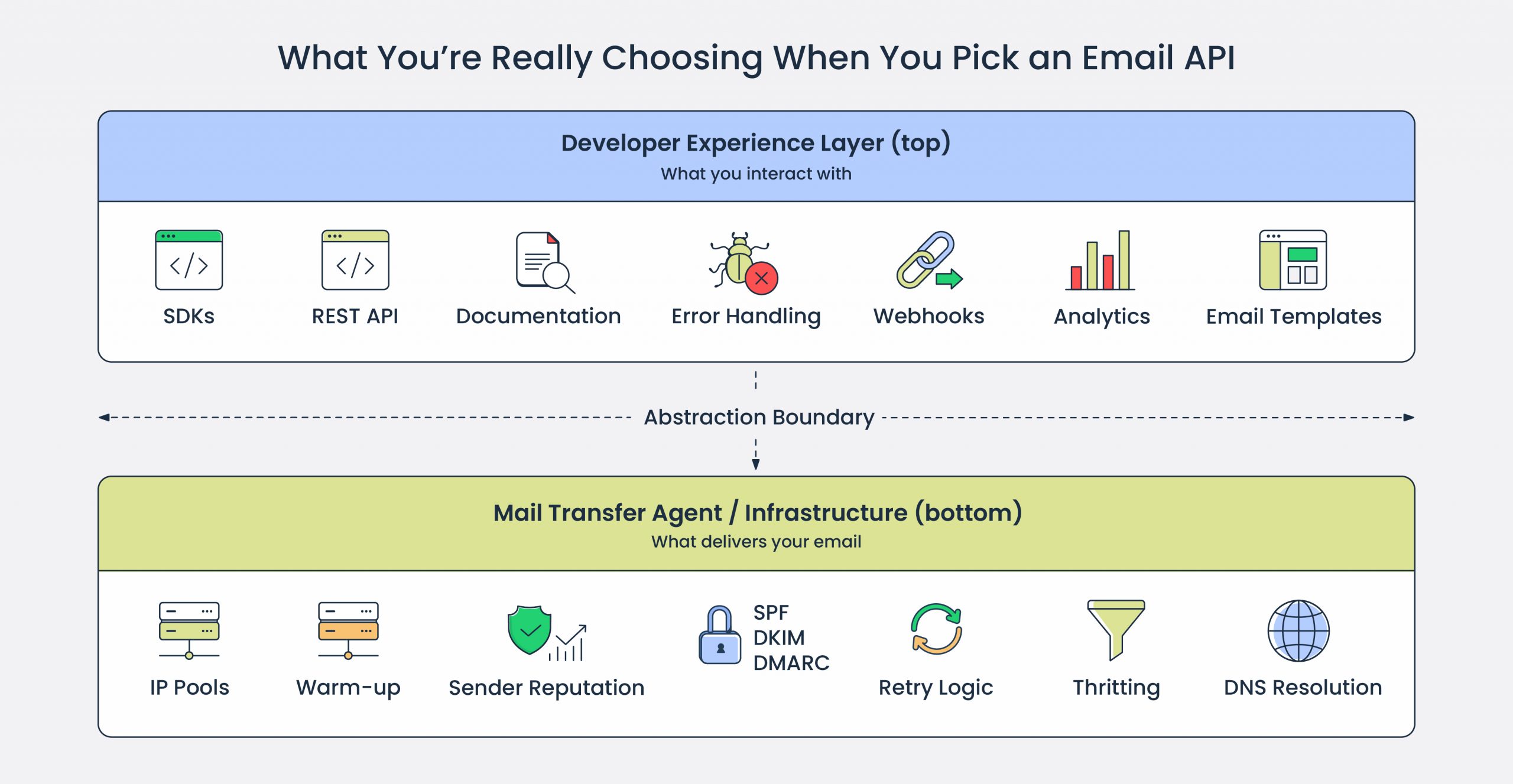
So, when choosing an email API for developers, you’re really choosing two things:
- The developer experience layer: SDKs, API documentation, error handling, webhooks, analytics, and email templates that make email API integration faster and email marketing automation easier.
- The mail transfer agent and email infrastructure that carries your email messages. That involves IP pools, warm-up, sender reputation, email authentication, retry logic, throttling.
The sections below break down what to evaluate when comparing the best email APIs for your use case.
Deliverability and infrastructure
An API is worth your time, only if it delivers emails reliably. Therefore, you need to focus on IP reputation, authentication setup, stream separation, and failure handling determine whether your email lands in the inbox.
For a deeper dive, see our guide on inbox placement, and here, you can check a quick breakdown of the most critical features. And here’s a quick breakdown of key features.
IP setup
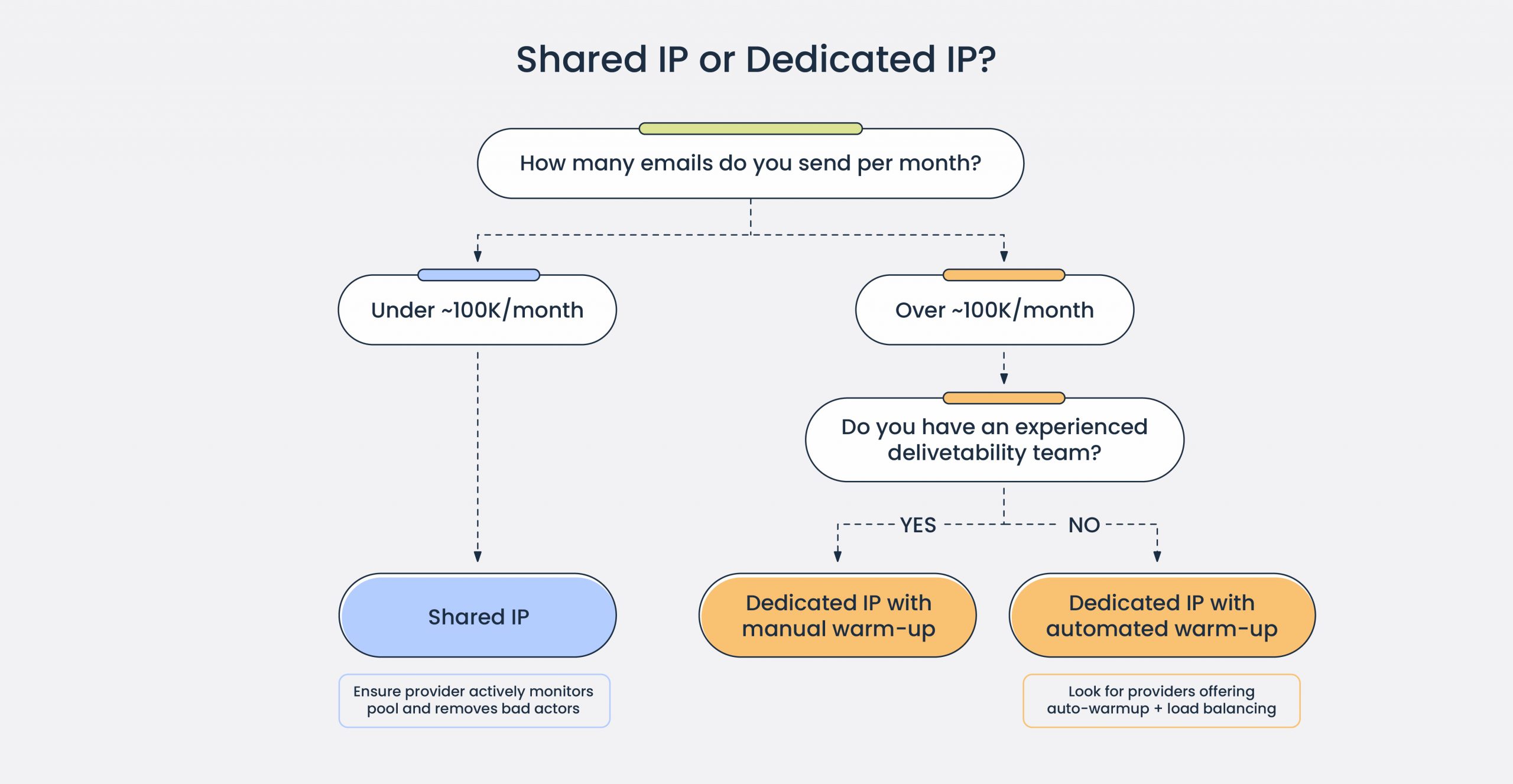
Shared IPs pool your sender reputation with other senders, so one spammer in the pool can tank your deliverability. Now, this doesn’t mean shared IPs don’t work at all. If you send under ~100K emails a month, shared IPs are a better choice than a dedicated IP address. However, you need to be sure that the provider actively monitors pool healtth and removes bad actors quickly.
On the other hand, dedicated IPs give you full control. They require warm-up, though: gradually ramping email volume so ISPs build trust. Doing this manually can be a pain unless you have an experienced team, so look for providers that offer automated IP warmup, ideally with some load balancing in the first months.
Check for:
- Dedicated IP offering – Some providers gate them behind enterprise tiers, with others it’s a paid add-on. Mailtrap, for comparison, offers them on a Business plan starting at 100k/month with automatic warm-up.
- Warm-up process – Some providers offer automatic or manual, or both.
Mailtrap offers dedicated deliverability experts starting from Business plan to assist with scaling and volume transitions.
Email authentication
SPF, DKIM, and DMARC setup is usually documented in domain verification guides. Review these before signing up to understand the configuration burden.
Look deeper:
- DKIM key rotation – Is it automatic? Mailtrap rotates DKIM keys monthly by default.
- Custom return-path – This determines SPF alignment.
Sending streams
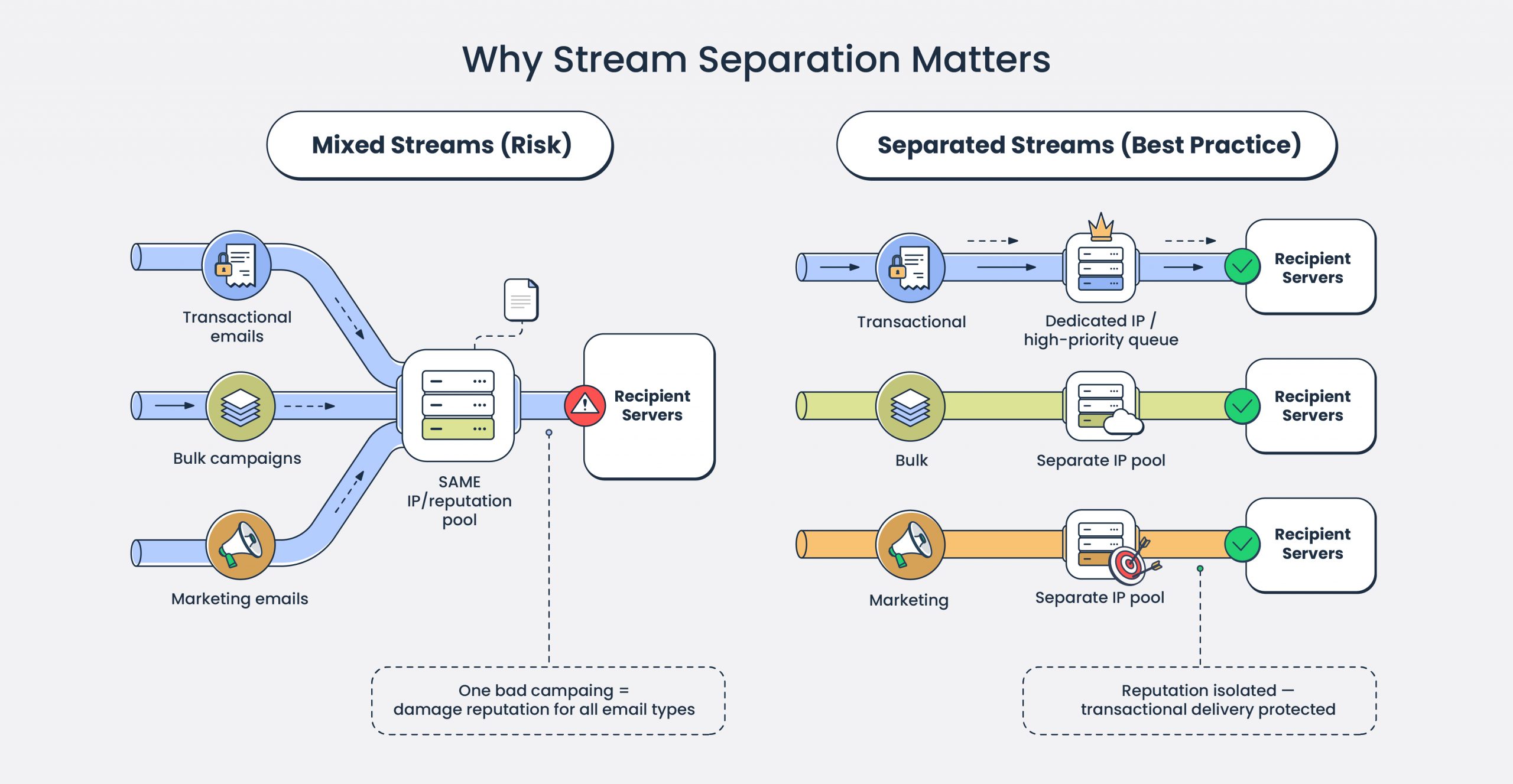
If you send transactional emails, bulk emails, and marketing emails, verify they’re routed through separate infrastructure. Bulk email campaigns carry higher complaint risk and require a straightforward unsubscribe option.
This is the setup you want: Mailtrap’s transactional email service, for instance, separates transactional and bulk into distinct streams with isolated reputation.
Check for:
- Stream separation – Look at landing pages or pricing comparisons. If unclear, ask directly.
- Queue priority – Time‑sensitive notifications (OTP, security alerts) shouldn’t get stuck behind bulk sends. Providers rarely document internal queuing, so ask sales/support how they prevent large campaigns from delaying transactional traffic.
Delivery failure handling
Understand how the provider handles temporary and permanent failures. For more on feedback loops and bounce processing, see our dedicated guide.
Check for:
- Retry logic – Temporary failures (4xx SMTP codes/deferrals) should be retried with exponential backoff (progressively longer intervals) rather than hammering the receiving server.
- Retry window – A good target is roughly 24–72 hours: short enough to surface failures promptly, long enough not to give up on transient issues. If a provider only retries for a few hours, you risk dropping messages during short‑lived outages.
- Hard bounce handling – Permanent failures (invalid mailbox, non‑existent domain, 5xx codes) should not be retried. Those addresses should be added to a global suppression list immediately.
- Feedback loop (FBL) processing –. When a mailbox provider sends a spam complaint via a feedback loop, that address should be automatically and immediately suppressed across all lists and streams, not just one segment and not days later.
Blocklist monitoring
Major blocklists like Spamhaus, Barracuda, or SpamCopcan impact any sender. The question is whether the provider monitors proactively and alerts you.
Mailtrap includes proactive blocklist monitoring with deliverability alerts as part of its infrastructure.
Scalability and throughput
Product growth drives email growth: more users, more signups, more triggered messages. High-volume email sending requires careful evaluation of rate limits and throttling.
Rate limits
Every email API service for developers enforces rate limits, but how they’re structured varies.
Check both:
- API rate limits – Requests per second to the sending endpoint. Relevant if you’re triggering emails from high-traffic events (signups, purchases, notifications).
- Sending rate limits – Emails per second or per minute the provider actually delivers. This is the real throughput ceiling.
Keep in mind that “High throughput” is marketing, not a spec; and Mailtrap, for example, documents rate limits transparently.
Throttling controls
Email throttling controls the rate of outbound SMTP traffic (messages and connections per time unit) from your sending infrastructure to recipient mail servers.
Check:
- Whether throttling is automatic or configurable.
- Whether you can set per-domain or per-IP throttling for sensitive recipients (e.g., sending to enterprise clients with strict receiving policies).
- How the provider handles ISP-imposed throttling. Do they queue and retry, or drop?
Aggressive sending, without throttling, triggers rate limiting on the receiving end, which hurts deliverability. Look for providers that offer a flexible email API, basically a configurable throttling or intelligent auto-throttling based on recipient domain feedback.
Batch sending
If you send bulk email campaigns or digests, check batch capabilities.
Check for:
- Maximum recipients per API call. Some providers cap at 100, others allow 1,000+. Mailtrap supports batch sending with up to 500 recipients per request.
- Whether batch sends are processed in parallel or serialized.
- Rate limits specific to batch endpoint vs single-send endpoint.
Integration and developer experience
The developer experience layer determines how fast you integrate the service and how easily you debug and troubleshoot. Here’s what to look at.
SDKs and library support
Check which programming languages the provider officially supports and how actively SDKs are maintained.
Check for:
- Maintenance frequency – Check the GitHub repo. Last commit 2+ years ago? Expect stale dependencies and unpatched issues.
- Open source – Can you inspect the code, fork if needed, contribute fixes?
- Installation friction – Is it a simple package install, or does it require manual configuration?
Mailtrap provides actively maintained Mailtrap SDKs for Python, Node.js, PHP, Ruby, Java, and Elixir.
API design
Evaluate the API structure itself. This affects how cleanly email sending API functionality integrates into your codebase. For a comparison of approaches, see SMTP vs Email API.
Check for:
- RESTful design – Predictable endpoints, standard HTTP methods, consistent JSON response formats.
- Payload simplicity – How many required fields to send a basic email? How nested is the JSON structure?
- Idempotency support – Can you safely retry requests without sending duplicate emails?
- Versioning – Is the API versioned? How are breaking changes communicated and handled?
Documentation quality
API documentation is where you’ll spend time when things break. Evaluate it like you’d evaluate the code.
Check for:
- Quickstart guide – Can you send your first email in under 10 minutes following docs alone? (This, of course, assumes you verified your domain first)
- Code examples – Are they copy-paste ready, or pseudocode you need to adapt?
- Error reference – Are error codes documented with causes and resolution steps?
- Changelog – Are updates, deprecations, and breaking changes clearly communicated?
- Search – Can you actually find what you need, or is it buried?
Mailtrap provides quickstart guides with copy-paste code samples for all supported languages and a complete API reference with documented error codes
Time to first send
Measure how long it takes from signup to a delivered email. This indicates onboarding friction and documentation quality.
Check for:
- Account verification process – Instant, email confirmation, or manual approval?
- Domain verification steps – Does the provider give you all the DNS records? How clearly is the verification process documented?
- Test sending – Can you send a test email quickly after signup to verify integration?
Error handling
When API calls fail, the response determines how fast you diagnose and fix.
Check for:
- Error format – Structured JSON with error codes, or plain text messages?
- Error specificity – Does it tell you what went wrong (invalid recipient, authentication failure, rate limit exceeded), or just “request failed”?
- Rate limit headers – Are remaining limits and reset times included in response headers?
Additionally, inspect how the provider handles audit logs, for instance:
- If you can export the logs for external SIEM or compliance archives.
- If the logs are Immutable – can you tampered with them, or they are append-only?
Mailtrap provides audit logs on the Enterprise plan.
Hype tip: Check if the email API service supports AI-native integrations and provides an MCP server.
Email logs and analytics
Logs and email analytics show delivery status, failures, and engagement. The depth and retention of this data determines how fast you diagnose problems when they arise.
Log retention and depth
Check what data is logged and how long it’s retained.
Check for:
- Retention period – Ranges from 3 days to 30+ days depending on provider and plan tier.
- Metadata vs full body – Some providers log only delivery events. Others retain full email content including headers, body, and attachments.
- Log access – Available via dashboard, API, or both?
- Export capability – Can you export logs for external analysis or compliance archives?
Mailtrap retains email logs for up to 30 days on higher tiers, including full body content with HTML preview and spam analysis.
Search and filtering
When you’re debugging, you need to find specific emails fast.
Check for:
- Search fields – Recipient, email sender, subject, message ID, status, date range.
- Filter combinations – Can you combine multiple filters (e.g., all bounced emails to @gmail.com in the last 7 days)?
- Response time -. Does search return instantly, or lag on large datasets?
- API access – Can you query logs programmatically for automated monitoring?
Tip: Test the log search with realistic queries before committing.
Delivery analytics
Beyond individual email logs, you need aggregate metrics to monitor sending health.
Check for:
- Core metrics – Delivery rate, bounce rate, open rate, click rate, spam complaint rate.
- Segmentation – Can you break down metrics by domain, campaign, tag, or time period?
- Trend visibility – Can you track metrics over time to spot degradation early?
Note that open and click tracking require pixel/link injection. Confirm this is configurable and understand the privacy implications for your use case.
And, with Mailtrap you get:
- Analytics documentation that details how tracking is implemented and configured.
- Actionable analytics with domain-level insights, mailbox providers’ breakdown, and deliverability monitoring.
Webhooks
Webhooks are critical for automation and monitoring workflows because they push event data to your systems in real-time.
Check for:
- Supported events – Delivered, bounced, opened, clicked, unsubscribe, spam complaint. The more granular, the better.
- Payload format – JSON is standard. Check for consistent schema and documented fields.
- Retry logic – If your endpoint is down, does the provider retry? How many times, over what window?
- Security – Webhook signature verification to confirm requests are authentic.
- Latency – How fast after the event does the webhook fire?
Mailtrap supports webhooks for all major events with documented payload schemas and retry logic.
Alerting
Proactive alerts surface problems before they escalate.
Check for:
- Configurable thresholds – Can you set alerts for bounce rate > X%, delivery rate < Y%?
- Alert channels – Email, Slack, or webhook to your monitoring stack?
- Granularity – Account-level alerts, or per-domain/per-campaign?
Heads-up: If the provider doesn’t offer configurable alerts, you’ll need to build monitoring on top of webhooks yourself. Factor that engineering cost into evaluation.
Pricing
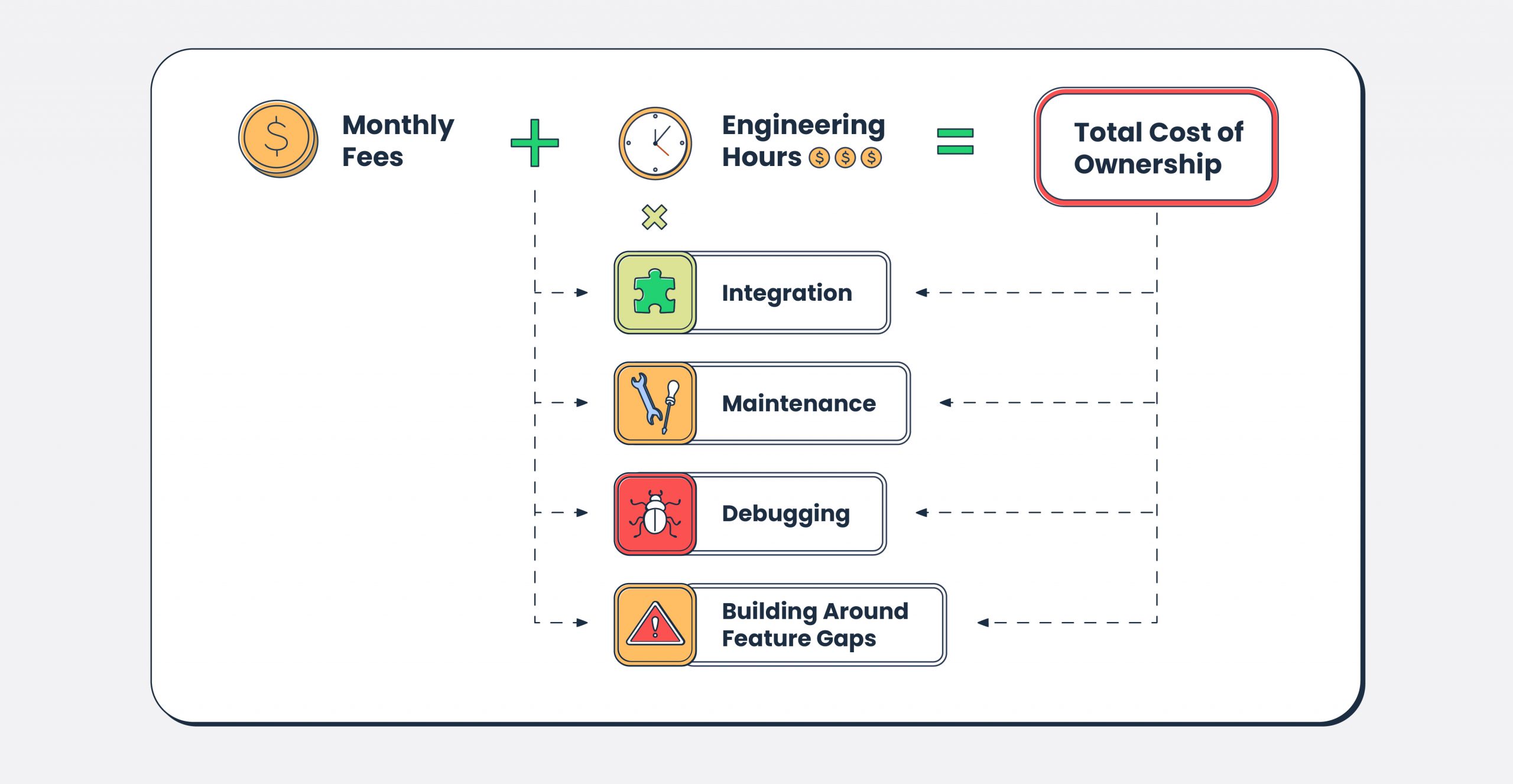
Keep in mind that the real comparison is the total cost of ownership. Here’s how to view it.
And here’s what to pay attention to.
Pricing model
Understand how the provider charges before comparing numbers.
Common models:
- Per-email – Predictable at steady volume, but costs scale linearly with growth. Calculate your actual unit cost: total monthly spend / emails sent.
- Tiered/monthly – Cost-effective if you consistently hit the tier; wasteful if you don’t. Do the math: a $85/month tier for 100k emails is $0.00085/email, but only if you send 100k.
- Pay-as-you-go – Flexible, but often higher per-email cost than committed tiers.
Pro Tips:
- Transactional email API service costs are typically a rounding error compared to other infrastructure (compute, database, monitoring). So, optimize for reliable email delivery and developer experience, not pennies per thousand emails.
- Use a free tier to evaluate API design and documentation quality. Specifically, measure time to first successful send. And don’t plan production architecture around free tier limitations.
- Look for clues of tight vendor coupling (proprietary template syntax, non-standard webhook formats) increases switching cost. Evaluate how portable your integration would be.
Overage costs
What happens when you exceed your plan limit matters more than the base price.
Check for:
- Overage rate – Is it the same per-email cost, or significantly higher?
- Hard cap vs soft cap – Does sending stop when you hit the limit, or continue at overage rates? Hard caps can break production flows silently.
- Notifications – Does the provider alert you before hitting limits, or after?
- Upgrade path – Can you upgrade mid-cycle, or wait until next billing period?
Compliance and security
Check certifications and access controls early, not after integration is complete. Why? Compliance gaps discovered late mean rework or starting over.
Certifications
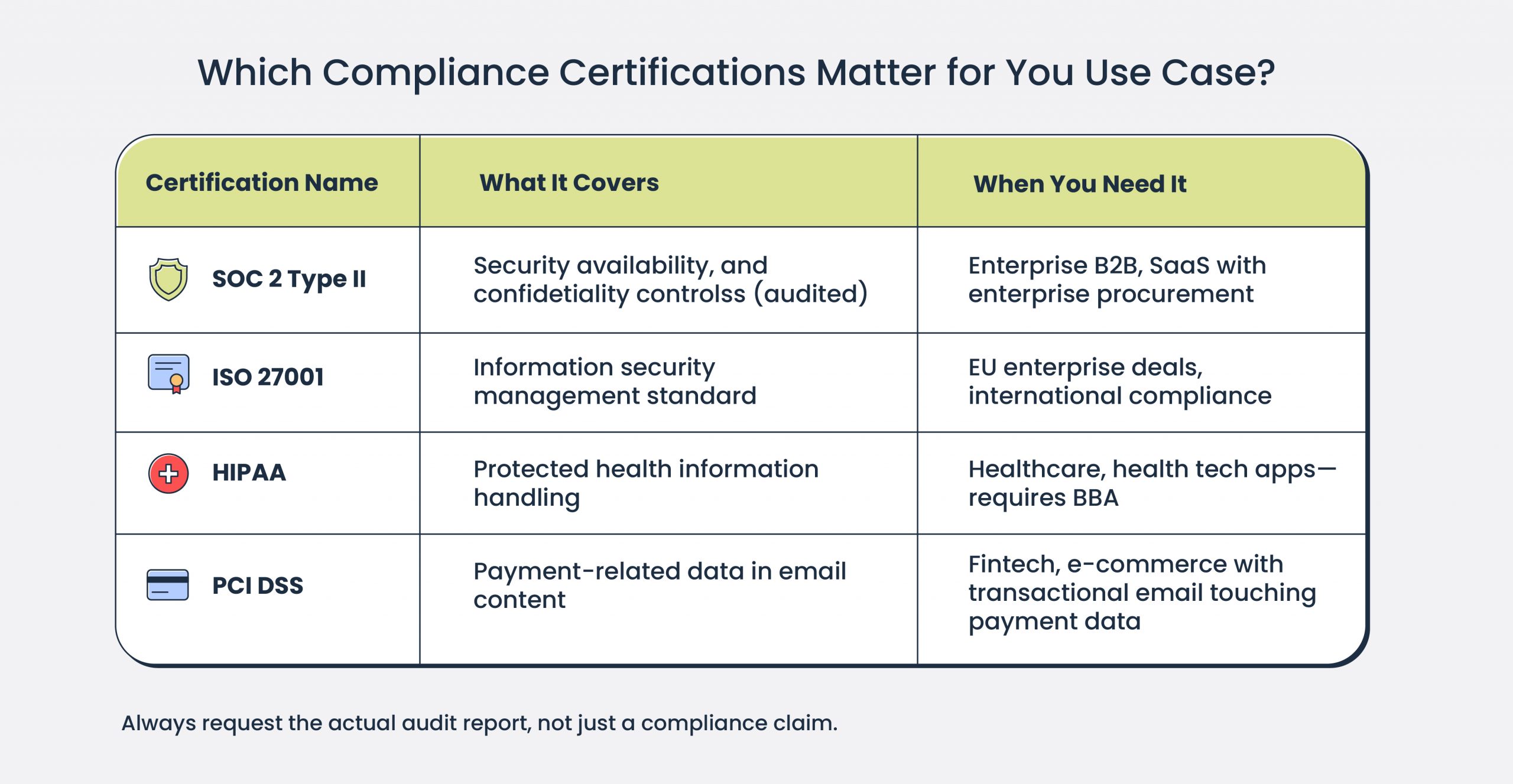
Certifications signal that a provider meets established security standards. Check which ones matter for your business needs.
Common certifications:
- SOC 2 Type II – Audited controls for security, availability, and confidentiality. Required by most enterprise procurement teams.
- ISO 27001 – International standard for information security management. Common requirement for EU enterprise deals.
- HIPAA – Required if you’re handling protected health information (healthcare, health tech). Requires Business Associate Agreement (BAA).
- PCI DSS – Relevant if email content includes payment-related customer data.
Ask for certification documentation upfront. “We’re SOC 2 compliant” means nothing without the audit report. Mailtrap is ISO 27001 certified and SOC 2 compliant, with documentation available at Trust Center.
Regulatory compliance
Beyond certifications, check alignment with regulations relevant to your business.
Key regulations:
- GDPR – Applies if you have EU users. Requires DPA (Data Processing Agreement), data subject rights support, and breach notification procedures.
- CCPA – California privacy law. Requires disclosure of data collection and opt-out mechanisms.
- CAN-SPAM – US email law. Requires an unsubscribe mechanism, so recipients must be able to remove themselves from your email list, physical address, and honest headers. A provider should support compliance, not enforce it for you.
- CASL – Canadian anti-spam law. Stricter consent requirements than CAN-SPAM.
Request the provider’s DPA and review data processing terms. If legal review is required before signing, factor that timeline into your evaluation.
Encryption
Check how data is protected in transit and at rest.
Check for:
- TLS in transit – Is TLS enforced for API connections? What versions are supported (1.2+ minimum)?
- TLS for delivery – Does the provider enforce or attempt TLS when delivering to recipient servers? Opportunistic TLS is standard; enforced TLS is stricter but may cause delivery failures to misconfigured recipients.
- MTA-STS support – Mechanism to enforce TLS for receiving servers that support it. Prevents downgrade attacks.
- Encryption at rest –. Are stored logs and email content encrypted? What key management is used?
If your security team requires specific encryption standards, confirm compatibility before integration.
Access controls
Evaluate how the provider handles authentication and authorization for your team.
Check for:
- API key scoping – Can you create API keys with limited permissions (send-only, read-only, specific domains)?
- Key rotation – Is there a process for rotating API keys without downtime?
- IP whitelisting – Can you restrict API access to specific IP ranges?
- SSO/SAML – Single sign-on integration for dashboard access. Often enterprise-tier only.
- Role-based access (RBAC) – Can you assign different permission levels to team members?
- MFA – Multi-factor authentication for dashboard login.
Granular access controls reduce blast radius if a key leaks. If the provider only offers full-access API keys, you’re one compromised key away from total account access.
Incident response
Check how the provider handles security incidents and breaches.
Check for:
- Breach notification – How quickly will you be notified? GDPR requires 72 hours.
- Status page – Is there a public status page with incident history and uptime data?
- Post-mortem process – Does the provider publish root cause analysis after incidents?
- Security contact – Is there a dedicated security team or email for reporting vulnerabilities?
Support and migration
The quality of customer support determines whether you resolve issues in hours or days. And if you’re switching from another provider, migration support can mean the difference between a smooth transition and weeks of deliverability problems.
Support channels and availability
Check how you can reach the support team and when they’re available, including.
- Channels – Is it email/ticket only, or there’s live chat, or phone? Engineers typically prefer chat or tickets for async ticket support; phone matters for critical outages.
- Availability – Is it business hours only, or 24/7? Check which timezone “business hours” refers to.
- Response time SLAs – Is there a guaranteed first response time? Does it vary by severity?
- Tier gating – Is priority support included, or locked to enterprise plans?
For example, Mailtrap offers 24/7 support from the email deliverability team with priority response starting from Business plan.
Onboarding assistance
First-time setup is where most issues occur. Check what help is available during integration, including.
- Guided onboarding – Is there a dedicated onboarding process, or are you on your own with docs?
- Domain verification support – DNS misconfiguration is common. Will support help troubleshoot?
- Warm-up guidance – If using dedicated IPs, is there guidance or active support for warm-up schedules?
- Integration review – Will someone review your setup before you go live?
Available onboarding support saves debugging hours and Mailtrap provides onboarding assistance for customers on Business plan or above.
Migration support
Switching email service providers isn’t just API integration. It’s DNS changes, IP warm-up, reputation transfer, and potential deliverability dips.
Check for:
- Dedicated migration assistance – Is there a team or process for customers switching from other providers?
- DNS transition guidance – Help with SPF, DKIM, DMARC cutover to avoid authentication gaps.
- Warm-up planning – If moving to new IPs, is there a warm-up plan tailored to your volume?
- Parallel sending support – Can you run old and new provider in parallel during transition?
- Reputation monitoring – Active monitoring during migration to catch deliverability issues early.
Mailtrap offers dedicated migration support including DNS guidance, warm-up planning, and deliverability monitoring, as well as step-by-step migration tutorials:
- from SendGrid
- from Mailgun
- from Amazon SES
- from Postmark
- from Brevo
- from Mailchimp Transactional Emails
Wrapping up
Choosing an email API service provider is choosing the infrastructure. The API interface (endpoints, SDKs, documentation) is what you interact with daily. But what determines whether your emails reach the inbox is everything behind it: IP reputation, authentication handling, retry logic, and stream separation.
Evaluate both layers:
- Infrastructure – Dedicated IPs, warm-up, authentication setup, sending streams, bounce handling, blocklist monitoring.
- Developer experience – SDK quality, documentation depth, error handling, time to first send.
- Analytics – Log retention, search capability, analytics depth, webhook coverage.
- Pricing – Total cost of ownership, not just per-email rate. Factor in feature gating and engineering time for workarounds.
- Compliance – Certifications, data residency, access controls. Check early, not after integration.
- Support – Availability, technical depth, migration assistance.
Don’t evaluate a transactional email API service for developers on docs alone. Send test emails. Trigger errors intentionally and inspect responses. Ask support technical questions and measure response time and quality. Check GitHub for SDK maintenance. These signals tell you more than marketing pages.
If you’re evaluating Mailtrap Email API: dedicated IPs from 100k/month with automatic warm-up, separate transactional and bulk streams, 30-day log retention, 24/7 support with deliverability experts starting from Business plan. Free plan includes 4,000 emails/month.
Useful links:
GitHub SDKs:
- PHP SDK (Laravel bridge, Symfony bridge)
- Node.js SDK
- Python SDK
- Ruby SDK
- Java SDK
- .NET SDK
- Elixir SDK
Step-by-step tutorials on how to send emails with REST API: