Parsing is the process of breaking down a block of text or data into smaller, more readable, and organized pieces of data. So, how do you parse or break down an email, and why would you do it in the first place?
In this article, I answer these questions (and some more) in an attempt to explain email parsing and show how it works under the hood.
For your convenience, I’ve split the article into the following chapters:
- What is email parsing?
- What is email parsing used for?
- How does email parsing work?
- Types of email parsing
- How to parse an email
- Email parsing FAQ
Disclaimer: This article has been prepared with the help of Mailtrap’s very own deliverability experts and engineers. So, all information that you see is a result of many years of experience running both outbound and inbound email infrastructure.
What is email parsing?
Email parsing is the automated process of converting an email into structured data that software can read and use.
First, a parser separates the message into its standard components, including:
- Headers such as the sender, recipient, subject line, and date
- The plain-text and HTML versions of the message
- Email attachments and their file information
The parser can then use parsing rules or AI to extract specific business information, often returning it according to a predefined schema. For instance, it might identify an invoice number, customer name, payment amount, or delivery address.
So, for example, an invoice received by email could be turned into structured fields like this:
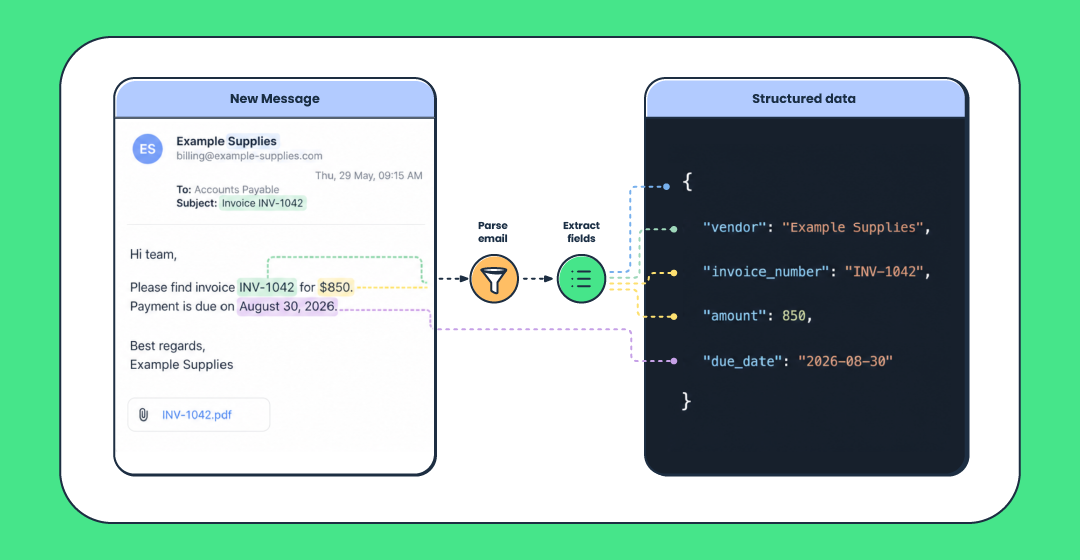
Finally, the structured data can be returned as JSON or sent to a CRM, help desk, database, spreadsheet such as Google Sheets, or another system.
This allows a business to process information from incoming emails automatically instead of having someone open every message and copy the relevant details manually.
What is email parsing used for?
The data you extract with the parser and how you use it largely depend on the industry you are in. So, here are some of the most common use cases.👇
E-commerce
Online stores receive order confirmations, payment notifications, return requests, and inventory updates in relatively consistent formats. From them, an email parser can extract some of the following information:
- Customer name and email address
- Order number
- Product names and quantities
- Payment amount
- Shipping address
- Order or payment status
You can then add the extracted information to an order-management system, accounting platform, or Excel spreadsheet. And if you combine it with workflow automation (e.g., via Zapier), parsing can also help you update inventory or initiate fulfillment without having to enter data by hand.
Customer support
Help tickets often contain information that your customer support team needs before they can respond, such as the customer’s contact details, account number, product, and description of the problem. A parser can extract these details and send them to a help desk system, where they can be used to create a ticket automatically.
Using custom parsing rules or AI, you can also classify customer issues, estimate their priority, and route them to the appropriate support team. This effectively reduces the time your team needs to spend organizing requests since they get relevant context as soon as they open a ticket.
Logistics
In logistics, shipping information is often sent by email to carriers, suppliers, fulfillment partners, etc. These messages may contain:
- Order and shipment numbers
- Carrier names
- Tracking numbers
- Dispatch and estimated delivery dates
- Delivery statuses
- Delay or exception notices
You can parse these details from emails and send them to a transportation or order-tracking system. This keeps shipment records current and allows a business to notify customers about deliveries, delays, or failed delivery attempts.
Lead generation
Sales inquiries may arrive from contact forms, marketplace notifications, event registrations, or direct emails. A parser can extract the prospect’s name, email address, company, phone number, requested product, and message.
The resulting data can be sent directly to a CRM, where it can, for instance, create or update a contact, assign the lead to the right person, or even trigger a follow-up workflow. This way, teams can respond more quickly while also reducing errors caused by manual data entry.
Note: It should go without saying, but you can parse any kind of email you want for your personal/preferred use case. The world of emails is your playground! 📨
How does email parsing work?
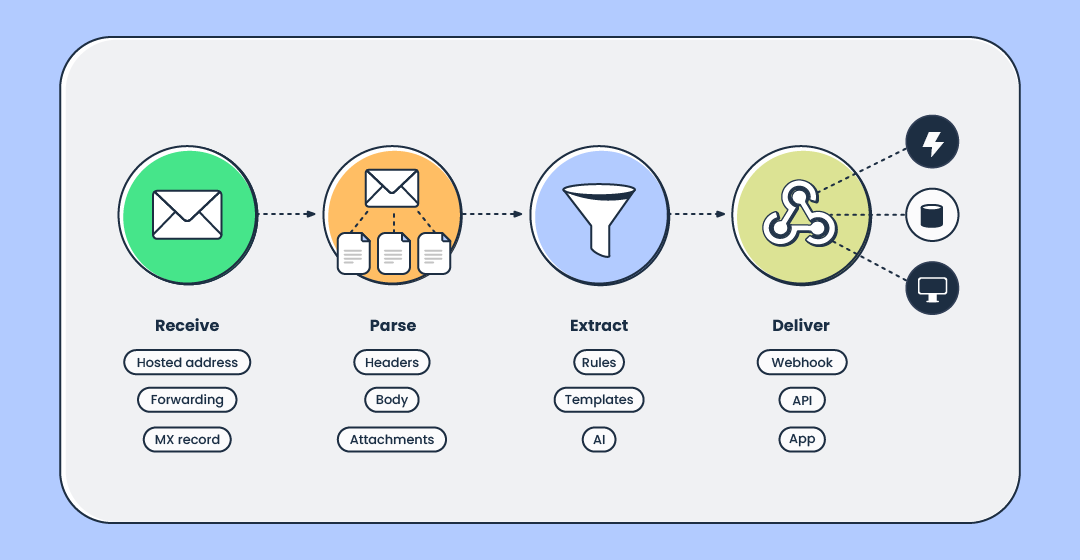
To explain email parsing more clearly, I broke it down into four stages:
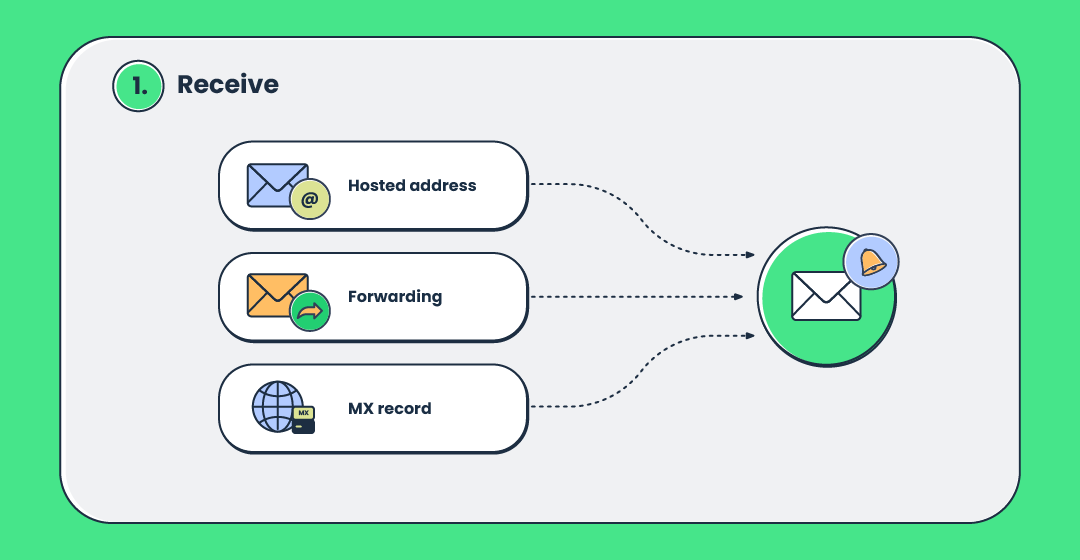
1. Receive
The email is sent to an address configured for parsing. This might be a dedicated address provided by an email parsing service, a forwarded mailbox, or an address on your own domain configured through MX records.
2. Parse
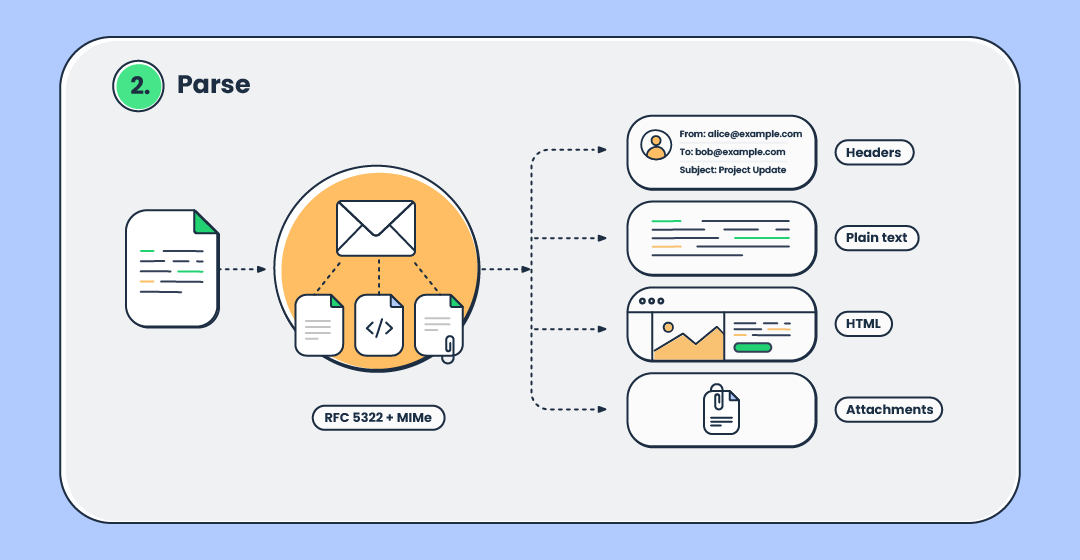
An email is not simply one block of text. Its basic structure is defined by RFC 5322, which separates the message into header fields and email body.
MIME, short for Multipurpose Internet Mail Extensions, extends this structure. It allows an email to contain different character sets, plain-text and HTML versions, multipart bodies, and non-text content such as images, documents, audio files, and other attachments.
MIME is defined through several related standards. The principal ones are RFC 2045, RFC 2046, RFC 2047, and RFC 2049. Together, they describe MIME headers, content types, multipart messages, transfer encodings, non-ASCII header text, and conformance requirements.
These standards are important to a MIME parser because it allows them to:
- Read header fields such as From, To, Subject, and Date
- Separate plain-text and HTML bodies
- Identify the parts of a multipart message
- Decode Base64, quoted-printable, and character-encoded content
- Extract attachments and their file information
At this stage, the parser is decoding and organizing the email’s technical components. It is not necessarily identifying business-specific information yet.
3. Extract
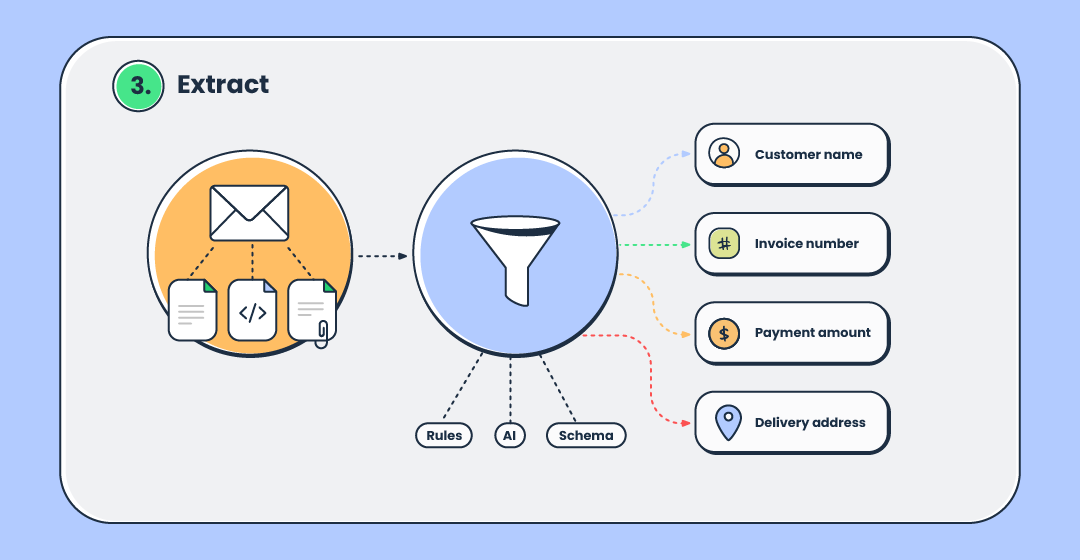
Next, the parser identifies the information your application needs. Depending on the use case, it may use, as I’ve mentioned previously, predefined rules, AI, or a managed schema to extract fields such as a customer name, invoice number, payment amount, or delivery address.
4. Deliver
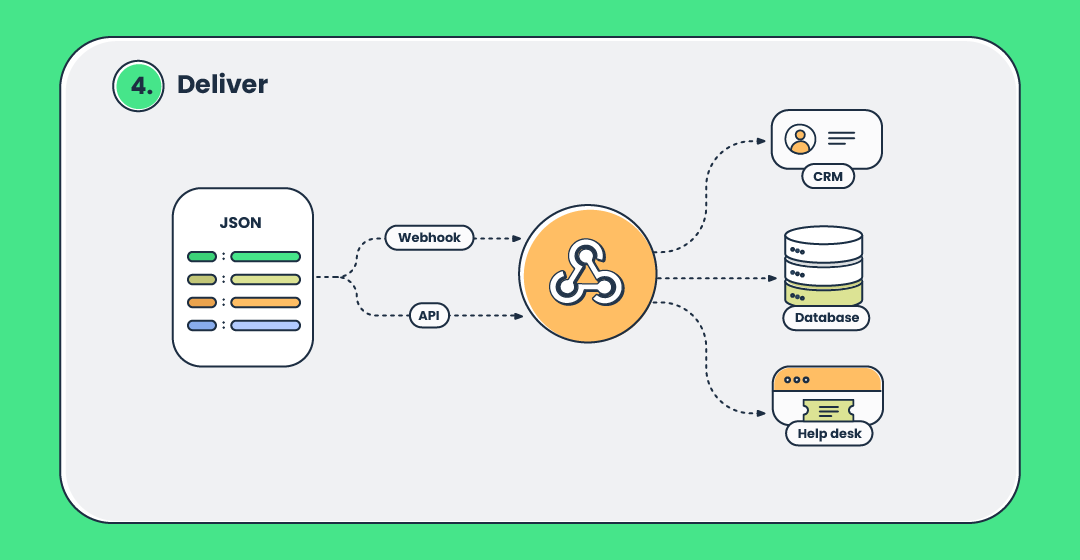
Lastly, the extracted information is converted into a structured format (commonly JSON, CSV, or XML) and delivered to your application through a webhook or API. And again, as previously mentioned, your application can then save it to a database, add it to a CRM, create a support ticket, or trigger another automated workflow.
Depending on the parsing service, the original email may also be included in the result or made available for later retrieval.
Types of email parsing
Once a parser has broken down an email’s headers, body, multipart sections, and attachments, the next step is to identify the business information you need. And based on how a parser identifies the information you need is how we get the most common types of email parsing.
The approaches below describe different parts of that process: how fields are extracted, how the output is structured, and who operates the parsing infrastructure. They are not mutually exclusive.
In production, rules, AI, schemas, and managed services are often combined into a single workflow. Think of them as components of a larger email-processing system rather than mutually exclusive alternatives. ⚙️
Rule-based / regex parsing
Best for: Emails with consistent formats, such as automated order confirmations, payment notifications, shipping notifications, and reports from known senders.
Rule-based parsers look for predefined patterns, labels, or positions within an email. For example, a rule could extract the text that appears after “Order number:” or use a regular expression to identify dates, email addresses, and tracking numbers.
This approach is fast, predictable, and relatively easy to test. It also allows developers to define exactly how each field should be identified and validated.
However, rules can stop working when the sender changes the wording or layout of an email. Maintaining a large number of templates can also become difficult when messages come from many sources.
AI / LLM parsing
Best for: Human-written messages, support requests, resumes, lead inquiries, and documents whose wording or layout varies between senders.
AI-based parsers identify information by analyzing the meaning and context of an email rather than relying only on fixed positions or exact patterns. For instance, you can ask an AI parser to extract fields such as a customer’s name, requested product, issue type, and level of urgency, even when different senders express that information differently.
However, a significant downside to AI / LLM parsing is that its results can be less predictable than those produced by fixed rules. Important fields should therefore ultimately be checked against a schema, validated by your application, or sent for human review.
Managed, schema-based parsing
Best for: Teams that want consistent JSON output, faster implementation, and a managed connection between incoming email and applications such as CRMs, databases, and help desk systems without running receiving infrastructure themselves.
Managed parsing covers the path from an incoming message to structured data your application can act on. The provider hosts the receiving address, handles RFC/MIME decoding, and delivers the result as JSON, usually through an API, via webhook, or a combination of both.
You typically get the decoded message (e.g., sender, recipients, subject, text and HTML bodies, headers, email attachments, etc.) as predictable named fields rather than a raw MIME blob.
Data extraction sits as a layer on top of that. Some providers allow you to define an output schema in advance, such as:
- Invoice number as text
- Payment amount as a number
- Due date in a standard date format
The service then returns data that follows that structure. Other providers deliver the decoded email and leave data extraction to your application, where you can apply rules, AI, or both.
In practice, a production system might use a managed service for email receiving and RFC/MIME decoding, rules for predictable fields, AI for variable content, and a schema to validate the final output before it reaches another application.
How to parse an email
Now that you know what email parsing is and how it works, let me demonstrate how to actually parse an email. In the example, I’ll show you how we do it over at Mailtrap with our very own Inbound email infrastructure.
How it works: You create an inbox through the Inbound Email API (a REST API) and get a hosted address like app1@inbound-mailtrap.io that works out of the box. Then, whenever you receive a message at that address, Mailtrap parses and stores it as structured data.
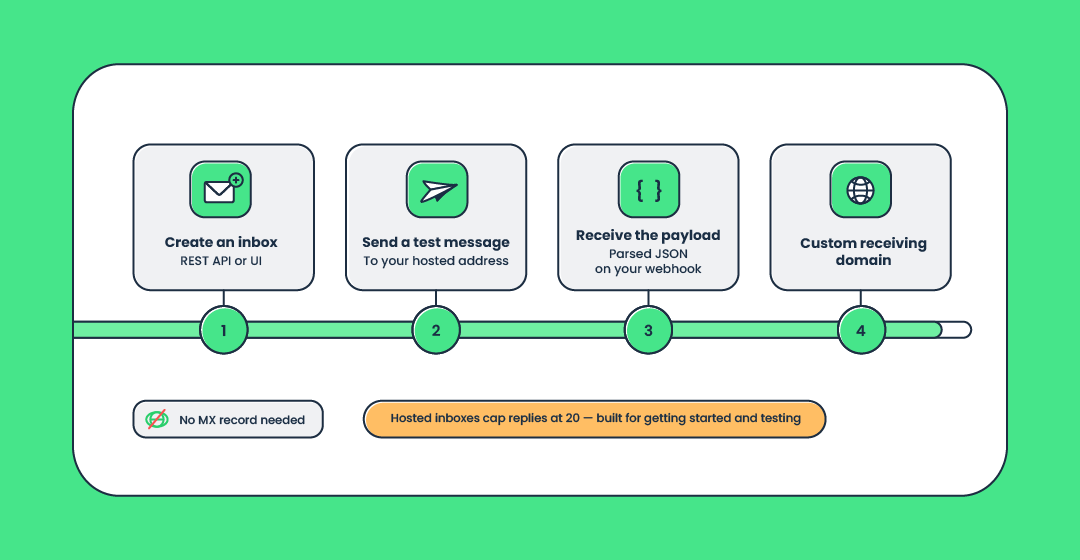
Here’s a quick walkthrough. We’re assuming two things:
- You already created a free Mailtrap account
- You’ve got your API token with admin permissions
Then, you do the following:
- Create a folder, an inbox, and copy the hosted @inbound-mailtrap.io address.
For this, use the following commands:
# 1. Create a folder
curl -X POST https://mailtrap.io/api/inbound/folders \
  -H "Authorization: Bearer YOUR_API_KEY" \
  -H "Content-Type: application/json" \
  -d '{"name":"Accounts Payable"}'

# → {"id":10,"name":"Accounts Payable"}

# 2. Create an inbox inside that folder
curl -X POST https://mailtrap.io/api/inbound/folders/{folder_id}/inboxes \
  -H "Authorization: Bearer YOUR_API_KEY" \
  -H "Content-Type: application/json" \
  -d '{"name":"Accounts Payable inbox"}'

# → {"id":1002,"name":"Accounts Payable inbox","address":"accounts-payable-a1b2c3d4@inbound-mailtrap.io","domain_id":892}

# 3. Copy the hosted address returned in the response
echo "accounts-payable-a1b2c3d4@inbound-mailtrap.io"Note: Make sure to replace YOUR_API_KEY with your actual Mailtrap API token. Also, replace {folder_id}, {inbox_id}, and {message_id} with the IDs returned by the corresponding API responses.
Send a message to that address.
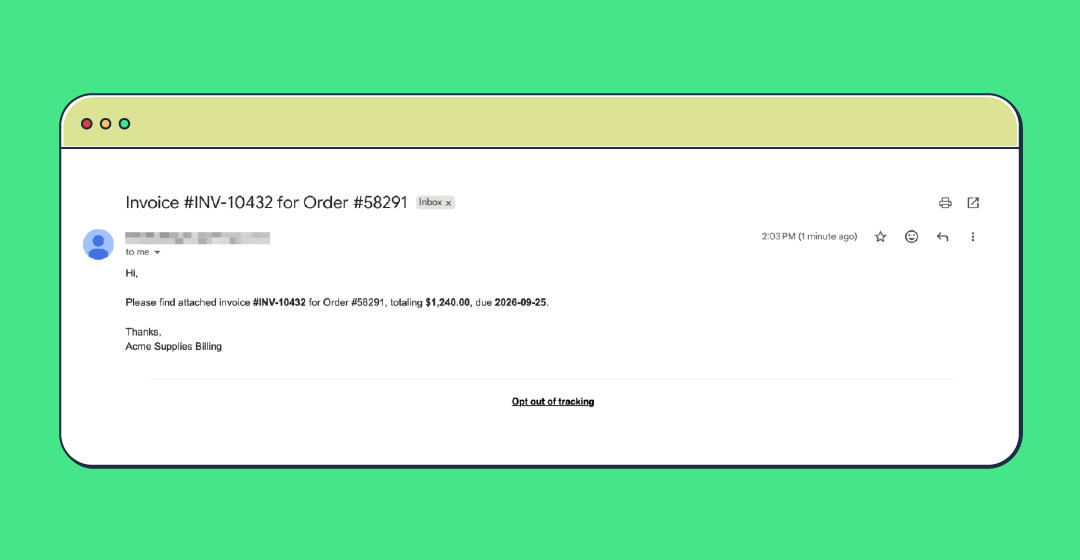
For the purposes of this article, I’ve sent a typical invoice email to my inbound address. In Gmail, it looked something like this:
- Receive the parsed message through the Messages API.
Then, I listed the messages in the inbox and fetched the full contents of the invoice email:
curl -X GET 'https://mailtrap.io/api/inbound/inboxes/{inbox_id}/messages' \
  -H "Authorization: Bearer YOUR_API_KEY"

# Then, grab the message ID from the list and fetch the full message:

curl -X GET 'https://mailtrap.io/api/inbound/inboxes/{inbox_id}/messages/{message_id}' \
  -H "Authorization: Bearer YOUR_API_KEY"
And here is what the invoice email looks like in the JSON output:
{
  "id": "1874622104589312768",
  "inbox_id": 1002,
  "from": "Billing <billing@acmesupplies.com>",
  "to": [
    "accounts-payable-a1b2c3d4@inbound-mailtrap.io"
  ],
  "cc": [],
  "bcc": [],
  "reply_to": "accounts@acmesupplies.com",
  "subject": "Invoice #INV-10432 for Order #58291",
  "headers": {
    "mime-version": "1.0",
    "return-path": "billing@acmesupplies.com"
  },
  "size": 116604,
  "html_size": 188,
  "text_size": 136,
  "received_at": "2026-08-26T09:15:42.310Z",
  "rfc_message_id": "<CAKp8Wn2XyzTQ9fRvLmNc4pBkJ3wQeYtHgVdRz1MooLPqAB@mail.acmesupplies.com>",
  "in_reply_to": null,
  "references": [],
  "thread_id": "1874622104590123456",
  "attachments": [
    {
      "filename": "invoice_10432.pdf",
      "content_type": "application/pdf",
      "size": 84213
    }
  ],
  "raw_message_url": "https://example.com/messages/1874622104589312768/raw.eml",
  "raw_message_expires_at": "2026-08-26T10:15:42.310Z",
  "html_body": "<div dir=\"ltr\">Hi,<br><br>Please find attached invoice <b>#INV-10432</b> for Order #58291, totaling <b>$1,240.00</b>, due <b>2026-09-25</b>.<br><br>Thanks,<br>Acme Supplies Billing</div>\r\n",
  "text_body": "Hi,\r\n\r\nPlease find attached invoice #INV-10432 for Order #58291, totaling $1,240.00, due 2026-09-25.\r\n\r\nThanks,\r\nAcme Supplies Billing\r\n"
}
For real-time workflows, you can also configure a webhook that notifies your application when a new message arrives, after which your application fetches the parsed message using its ID.
When you’re ready to receive on your own domain in production, custom receiving domains (the classic point-your-MX-record-at-us setup) are available on Mailtrap.
Bonus: You can use Mailtrap’s inbound email API to set up an Agent Inbox for your favorite AI tools.
Email parsing FAQ
Is email parsing free?
Email parsers range from free to paid, depending on the service you choose. For example, Mailtrap’s free plan includes up to 4,000 emails per month, shared between sending and receiving.
What is an email parsing example?
For example, a customer support team can use email parsing software to extract the sender’s contact information, account number, issue type, and message content from incoming requests. The parser can then send this data to a help desk system, where it automatically creates and assigns a support ticket.
Can you parse email in PHP (or other languages)?
Yes, you can parse email in PHP with its dedicated MailParse extension or Symfony Mime. Similarly, you can parse email with any other language, as long as it has a dedicated MIME/email library. Python has the standard library’s email package, Java has Jakarta Mail, JavaScript has MailParser for Node.js, etc.
Email parsing vs. web scraping vs. email rules
Email parsing extracts data from emails and turns it into structured fields. The data it extracts includes email header content, body content, attachments, etc. On the other hand, web scraping (or a web scraper API) extracts information from web pages, such as product names, prices, headlines, and other page elements.
There are also email rules that manage and organize messages inside your email client (e.g., Gmail, Outlook, etc.) by sorting, moving, labeling, or deleting them.
Wrapping up
To sum up, email parsing converts incoming messages into structured data that applications can process automatically. It can separate headers, bodies, and attachments, extract relevant business information, and deliver the result to another application, commonly as JSON.
To set up email parsing without operating your own inbound email infrastructure, you can use Mailtrap’s Inbound Email API, which converts incoming messages into predictable JSON that your backend can process immediately.
Further reading: