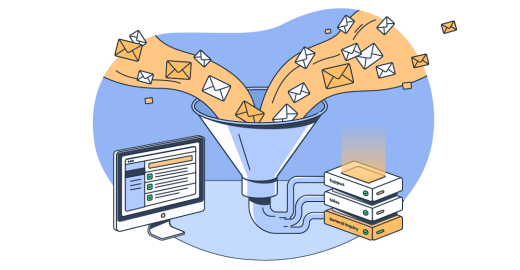
In this guide, you’ll learn what inbound email is, how receiving, parsing, and routing incoming email work, what you can build on top of it, and how to set it up.
The guide is mainly for developers who need an app to receive and process incoming email. And, marketers will get a better understanding whether “inbound” applies to campaigns.
Let me break it down.
What is inbound email?
Inbound email is the email your app or service receives. It pops up under several names including: incoming email, incoming messages, received email, and inbound message. Yet, they all point in the same direction; toward your app or service.
Whatever you call it, this email also gets processed, parsed into structured data, then acted on by your code. Now, lemme give you an example – when someone replies to support@yourapp.com and your code turns that reply into a support ticket, that’s inbound doing its job.
There’s a second, narrower sense that comes from marketing. Inbound email marketing refers to opt-in messaging to an audience that asked to hear from you. For instance, promotional emails and newsletters land on the inbound marketing side since the subscribers have signed in.
Here are the two different concepts at a glance, without going into further detail on inbound marketing:
| Usage / context | What it means | Who it’s for |
|---|---|---|
| Technical / infrastructure (primary) | Email your app receives, parses, and acts on programmatically | Developers, product and platform teams |
| Inbound-email marketing | Opt-in mail from a warm audience that chose to hear from you | Marketers, lifecycle teams |
To remind you, this guide leads with the technical sense; the marketing one got a single fenced section and nothing more. If you come for the marketing angle, our inbound vs outbound breakdown and cold email personalization article go deeper than I will.
Inbound vs. outbound email
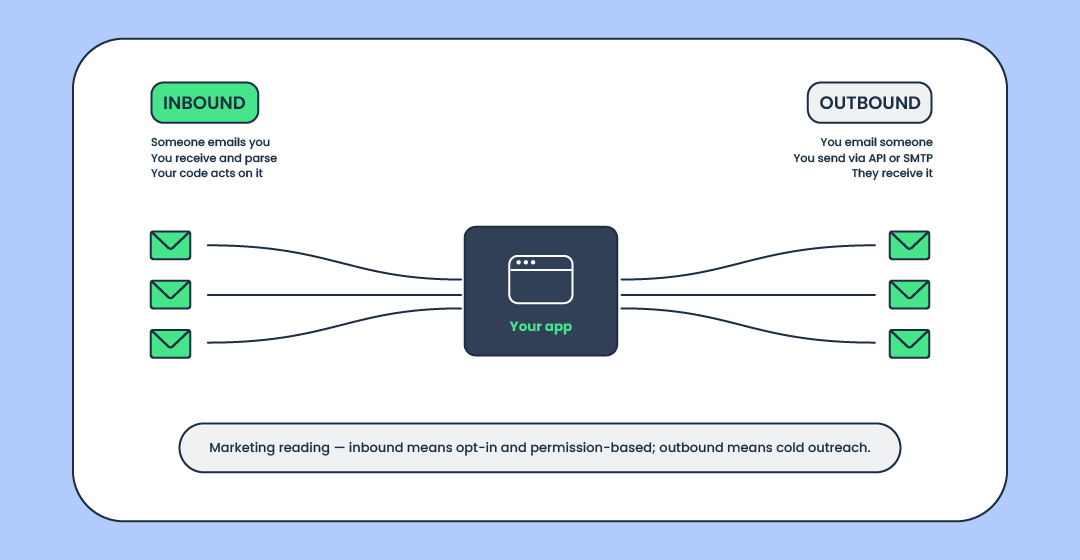
The whole distinction is the direction in which the email moves (to or from your app). Everything else is downstream of that.
| Dimension | Inbound | Outbound |
|---|---|---|
| Direction | Email you receive | Email you send |
| Technical usage | Receiving, parsing, routing incoming mail | Sending transactional emails or bulk mail via API/SMTP |
| What kicks it off | Someone emails you | You email someone |
How inbound email receiving works
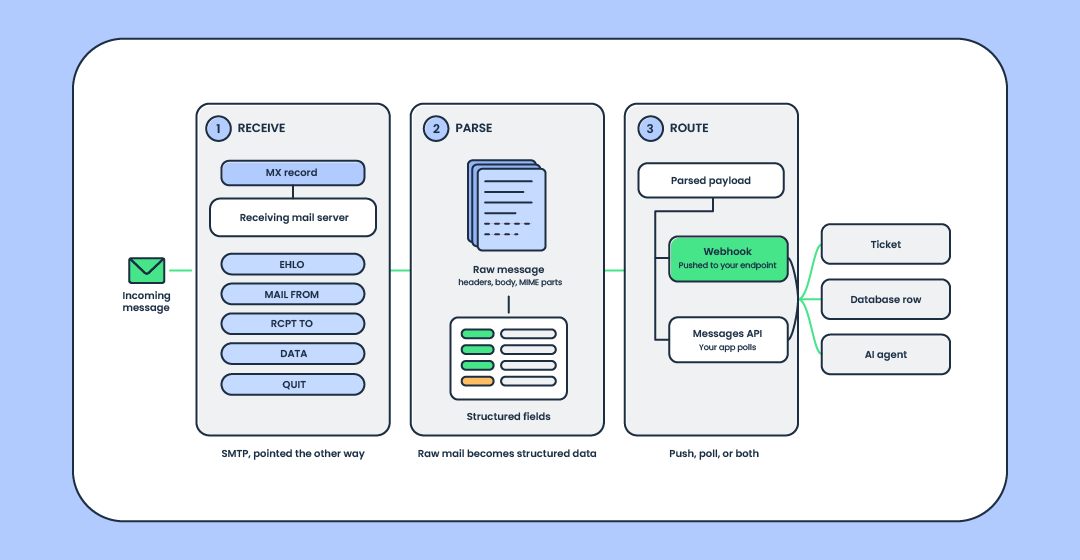
Receiving email happens in three stages: receive, parse, and route.
Skip one and you end up with one or both of the likely issues:
- There’s a message your code can’t read
- Clean data never reaches the part of your app that needs it
Therefore, it pays to take a closer look at each stage.
Receiving: how mail reaches your app
To receive an email at your domain, you need an MX record. It’s the DNS entry that names which server accepts emails for a particular domain. You point the record at the server that should receive the messages, the sending server looks it up and knows where to deliver.
Most devs use a dedicated subdomain (inbound.yourdomain.com) instead of the root domain. It keeps the inbound routing separate from whatever else the root domain is doing.
The handshake itself runs over SMTP, the same protocol that carries outbound email, just pointed the other way. And the mechanics of an accepting server is defined in the RFC 5321.
Parsing: turning a raw email into structured data
Parsing turns a raw email into structured email data your code can read. Typically, a JSON payload with the sender, subject, text and HTML bodies, email headers, and attachments broken out as fields. This is email parsing, or email-to-webhook if you like the buzzier name; vendors also sell it as a receive email API.
Two specs sit under this step, and they’re worth keeping straight.
- The message format (headers, the From/To/Subject/Date fields) is RFC 5322.
- MIME (multipart structure, attachments, character encodings) is a separate series starting at RFC 2045.
People bundle them as “5322 and MIME” all the time; they’re related but not the same document. From there, the parsed payload travels onward as a webhook, which is worth understanding on its own if webhooks are new to you.
Routing: getting the parsed email to the right place
Routing is the process of moving the parsed payload to wherever it needs to go: a webhook endpoint, or an inbox, a handler, or a downstream service you select by setting rules.
Note that PUSH isn’t the only option. A provider can POST the payload straight to your endpoint, or expose a messages API you poll on your own schedule. Or, it could do both, which matters when an app can’t accept inbound HTTP.
Additionally, routing makes the two-way conversation possible because you can match an incoming message to an earlier thread. This way, the reply_by_email command becomes a lookup.
To put it simply, an inbound email route is just a rule that says “messages matching this go there.” Nothing fancy, but routing makes the difference between a pile of parsed emails and a system that does something meaningful with them.
How to set up inbound email receiving
Every provider exposes inbound receiving a little differently, so I’ll show how we do it at Mailtrap. Treat it as a demonstration of the shape, the spec sheet lives in our official docs.
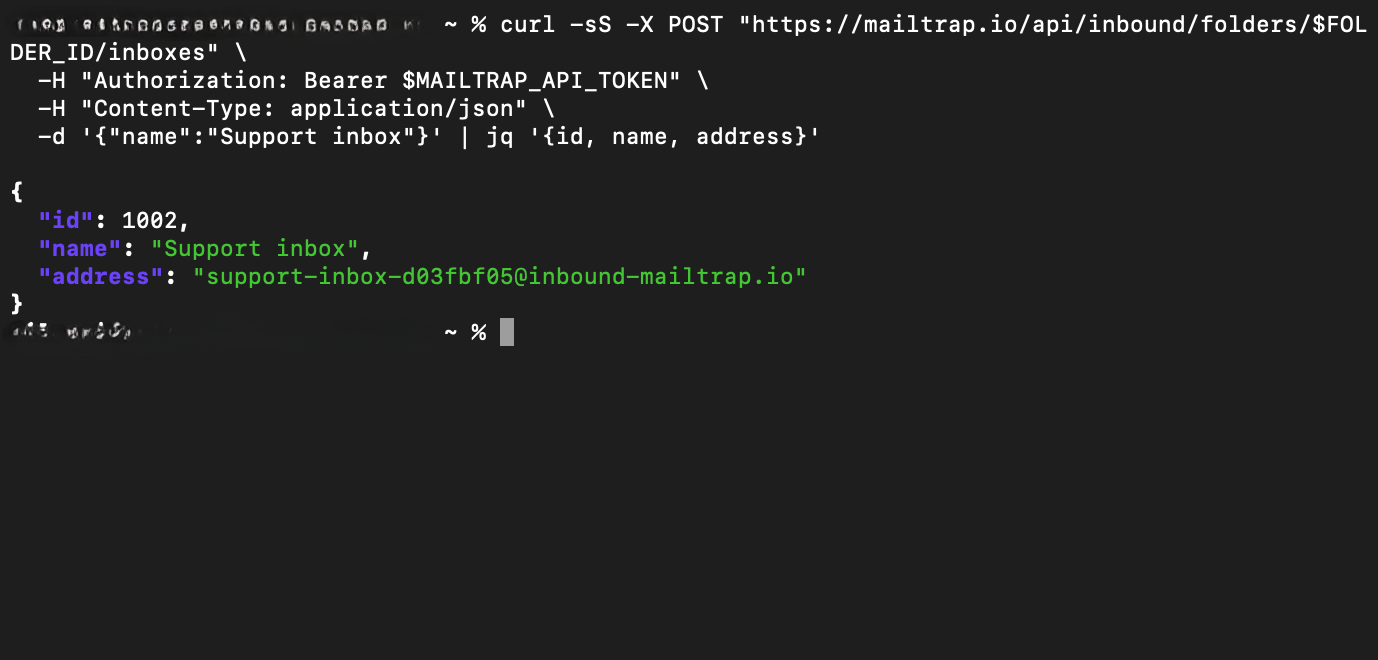
Now, there’s no DNS step to start. You create an inbox through the Inbound Email API (a REST API) and get a hosted address like app1@inbound-mailtrap.io that works out of the box. No MX record to point, no email server to set up; the address accepts email the moment it exists.
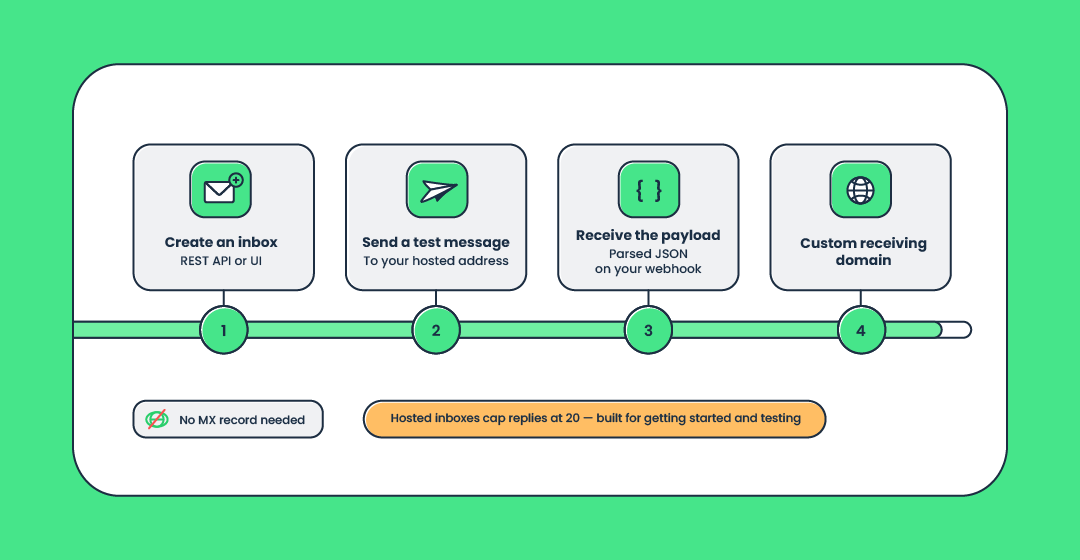
Here’s a quick walkthrough. We’re assuming two things:
- You already created a Mailtrap account
- You got account admin API token safely stashed into environment variables
Thereon, you do the following:
- Create an inbox and grab its hosted @inbound-mailtrap.io address.
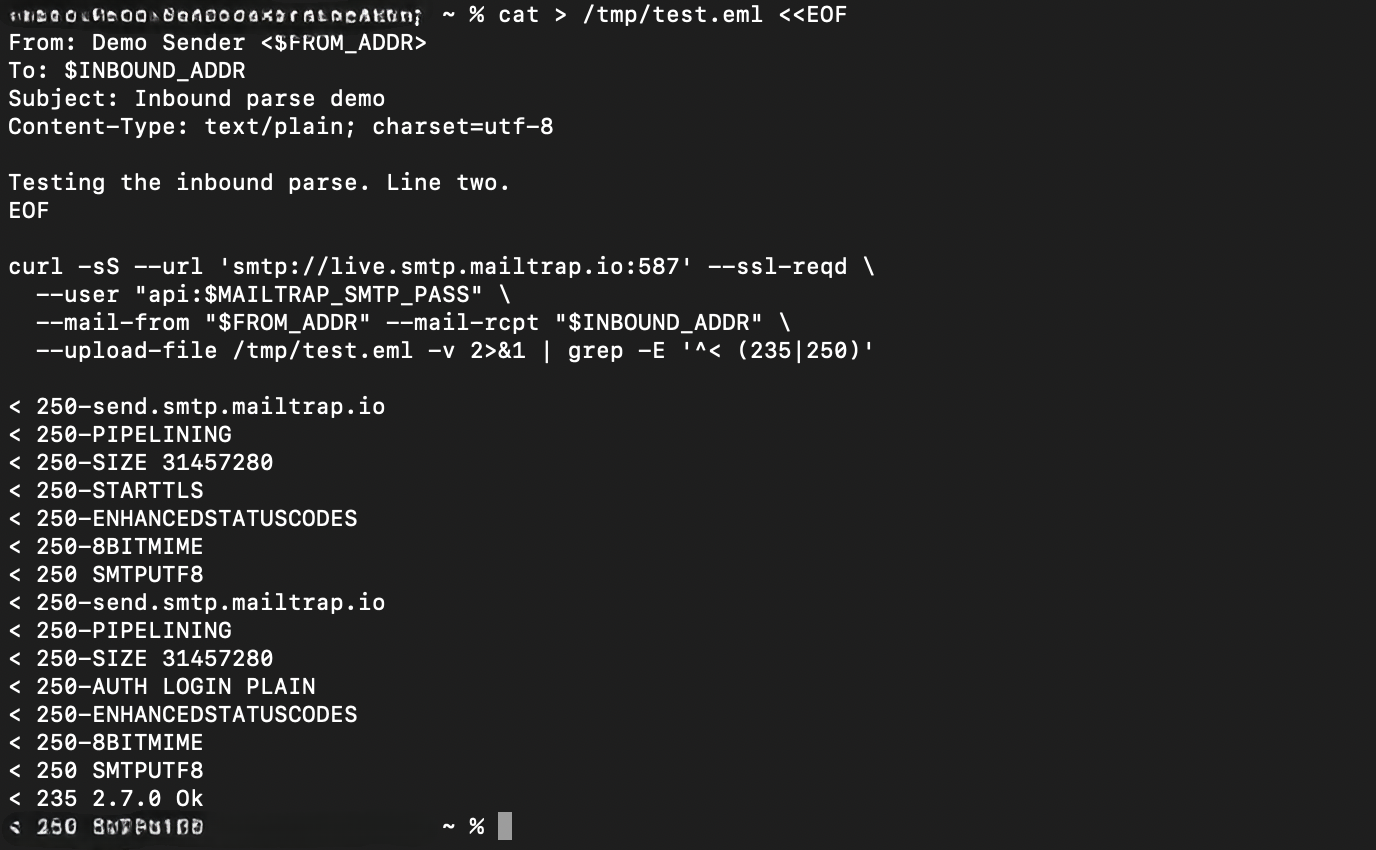
- Send a test message to that address.
- Receive the parsed JSON webhook payload and read the necessary fields.
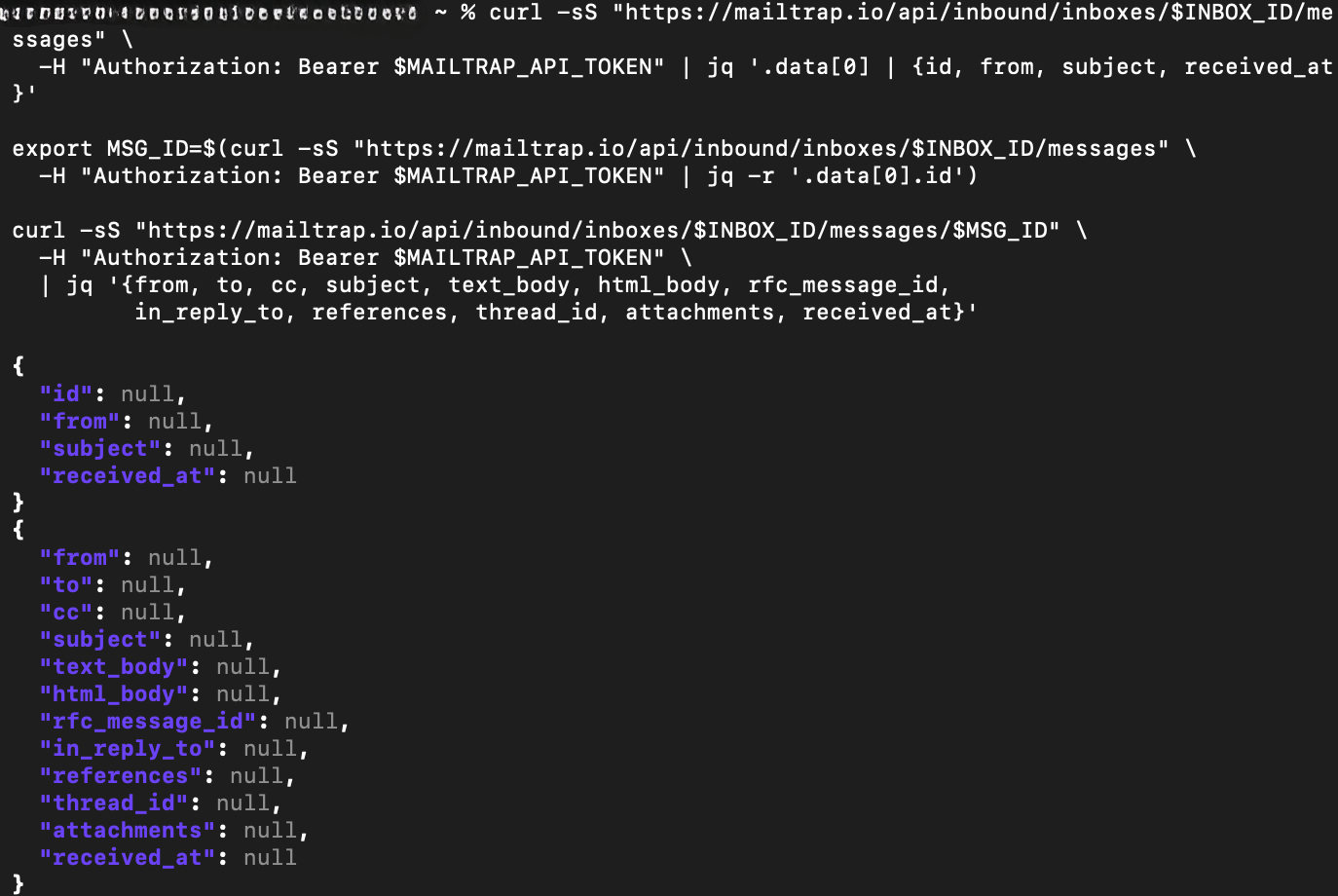
Technical note: The payload above is illustrative – we used a dummy email just to showcase the schema.
Anyway, every message reaching that address becomes a parsed webhook your app can turn into a database row, a Slack ping, or a ticket. For most people searching this, that flow is the whole answer.
But, there’s a ceiling worth knowing about before you build on it. Hosted inboxes cap replies at 20, which makes this path right for getting started and testing, not for a high-volume production mailbox.
When you’re ready to receive on your own domain in production, custom receiving domains (the classic point-your-MX-record-at-us setup) are available on Mailtrap, check the link ◀️.
What can you do with inbound email?
Most people arrive thinking some version of “I want my app to receive and act on emails automatically” or “turn incoming email into a webhook event.” Once you can do that, the same handful of patterns show up again and again.
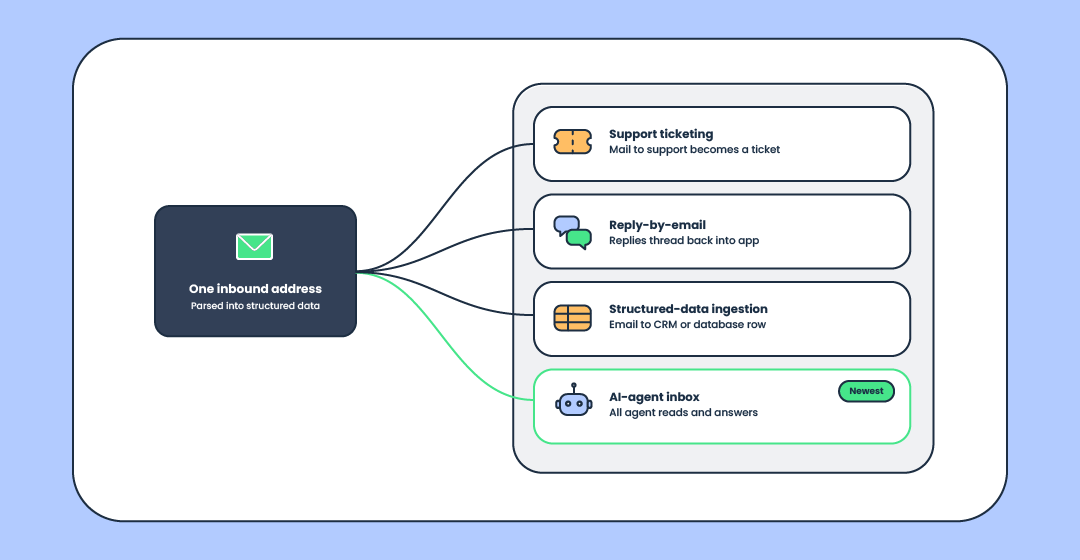
Support ticketing: turn support@ into tickets
The classic. Email to support@ becomes a parsed payload, and your code opens a ticket with the sender, subject, and body already in the right fields. No copy-paste, no human staring at a shared inbox deciding what’s a ticket and what’s a newsletter. Email-to-support-ticket is usually the first thing teams build, because the manual version is exactly the kind of task people quietly hate.
Reply-by-email & two-way conversations
Because you can match an inbound message to an earlier one, replies can flow straight back into the app that started the thread. A user answers a notification from their own mail client; your system reads the reply, threads it, and moves on. That two-way email conversation is what turns inbound from a mailbox into an interface.
Structured-data ingestion: email-to-CRM, email-to-database
As mentioned, plenty of email is really just data wearing an envelope: order confirmations, form submissions, alerts from other tools. Email data extraction pulls the useful bits out and drops them where they belong, whether that’s email-to-CRM, a spreadsheet, or a database row. The email is the transport; the structured data is the point.
AI-agent inboxes: an inbound address an AI agent reads and acts on
This is the newest use case, and the one the ecosystem is clearly moving toward. A few players name it directly: inbound.new and its open-source project inboundemail/inbound are built expressly around giving developers and agents programmable email addresses. Read those as early signals; the category is young enough that nothing here is settled.
The part that interests us is what happens one step further in. You can give an AI agent its own scoped address through the AI Agent Email Inbox, and because Mailtrap’s MCP server exposes inbound tools directly (creating inboxes, reading messages, replying, forwarding, working with threads), the agent manages its own mail rather than waiting for you to plumb it in.
The sharper version of the idea is that setup itself can be agent-assisted. Feed the agent the documentation and let it wire up the endpoint. A competitor can describe an agent inbox; it’s harder to fake docs an agent can consume well enough to configure itself.
If you’re weighing tools, we compared the agent email APIs and the email MCP servers worth knowing, and the email infrastructure overview maps the wider picture.
To rehearse safely, point agent replies at a Sandbox for AI workflow before anything touches production. Handing an autonomous agent a live inbox with nowhere to rehearse is the sort of decision you make exactly once.
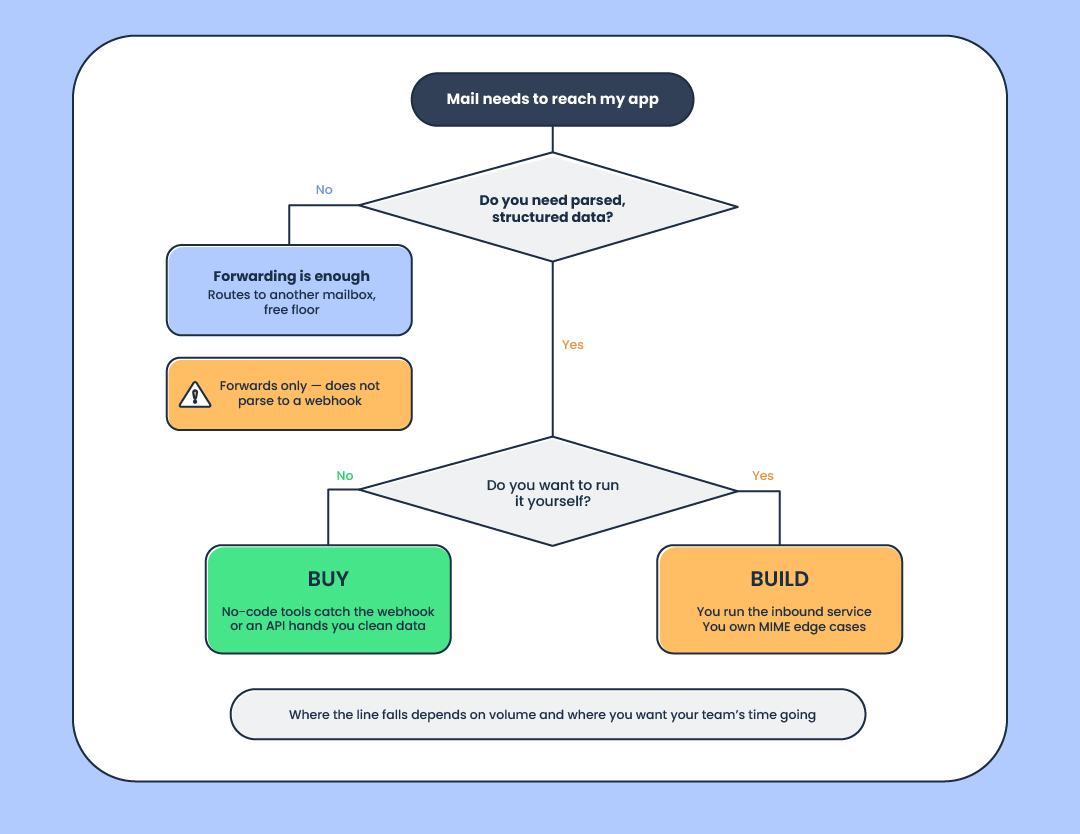
Build vs. buy inbound email
The answer to building vs. buying depends on the current needs of your app and your team’s fire power. To put things into perspective, based on our research, if you got a dev crew who can wire up inbound via AWS, the volume justifies the action above 1M inbound emails a month.
Also, there’s a no-code path. Zapier or Make.com can catch an inbound webhook and drop it into a spreadsheet or CRM without you writing a line of code. And there’s a genuine ‘you-code’ free floor below that, too.
Cloudflare Email Routing handles email forwarding from your domain to another mailbox for nothing. One caveat, because I’ve seen people expect more from it; base Email Routing forwards, it doesn’t parse to a webhook. You can parse inside a Cloudflare Email Worker, but that’s you building it, not the product handing it to you.
All in all, the build path is what you reach for when forwarding isn’t enough, when you need the structured payload (parse, then webhook, then app logic) rather than a copy of the message in another inbox. That’s the line between build and buy: the upkeep of running your own inbound email service versus renting an API that hands you clean data.
Inbound email security: spam & phishing
Every inbound address is also an attack surface. The moment an email can reach your app, so can spam, phishing, and malware. Accepting everything unconditionally is the wrong default and here’s how to approach it properly.
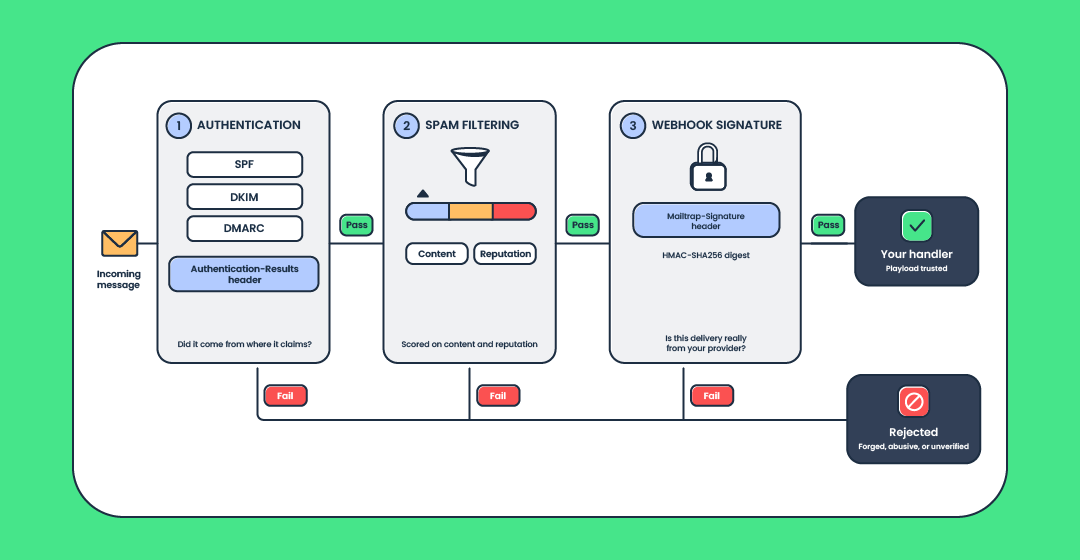
Start with email authentication. DNS records (SPF, DKIM, DMARC) tell you whether a message came from where it claims, and a failed check on inbound mail is a strong signal something is forged. Layer spam filtering on top of that and score messages on content and reputation before they reach your handler. Check our overview of spam filters and how these signals are weighted.
Two mechanics are worth wiring in from the start, and both are cheap.
- Verify the webhook itself. Mailtrap signs inbound payloads with HMAC-SHA256 and puts the digest in a Mailtrap-Signature header, so your endpoint can tell a real delivery from someone who guessed your URL.
- Read the verdicts already sitting on the message. Receiving servers record SPF, DKIM, and DMARC results in the Authentication-Results header, so your handler can branch on what’s there instead of re-running the checks itself.
If you manage authentication for your own domain, watch for the common misconfiguration of stacking multiple SPF records, which quietly breaks validation.
Also note that bulk-sender expectations from Google and Yahoo now enforce are a useful baseline for what legitimate mail should look like; both publish their requirements in Gmail’s sender guidelines and Yahoo’s sender best practices.
Wrapping up
So, what is inbound email? Technically, it’s the mail your app receives and processes.
If you want to see the receive-and-parse flow end to end, the Inbound Email API is the fastest way to watch a message become a webhook, and the AI Agent Email Inbox is where the agent-inbox idea gets real.
When you’re ready to compare providers rather than concepts, a head-to-head of inbound APIs is the next thing worth reading. Understanding what is inbound email is the easy part; what your app does once the crate is unpacked is where the real work starts.
FAQ
What’s the difference between inbound and outbound email?
Inbound is the email your system receives and acts on; outbound email is mail it sends. In marketing terms, inbound leans permission-based while outbound covers cold outreach, but the core distinction is direction, nothing more.
How does inbound email parsing turn a received email into usable data?
Parsing reads the raw message (headers, body, MIME parts, attachments) and returns structured email data, typically a JSON payload with clean fields. Your app then works with those fields instead of decoding raw mail itself.
How does incoming email get routed to the right app or inbox?
The parsed payload is delivered to a webhook endpoint, or pulled from a messages API your app polls, or sorted by routing rules to the right handler. A rule matches some property of the message (the address it hit, say) and sends it where it belongs.
Why do inbound emails get filtered as spam, and what stops phishing before it reaches the inbox?
Filters score inbound mail on content, reputation, and authentication results, and hold back anything that looks forged or abusive. SPF, DKIM, and DMARC checks are what catch phishing early, by exposing mail that fails to prove it came from where it claims.
Can you give an AI agent its own inbound email address?
Yes. You can provision a scoped address an agent reads and replies to, and manage that inbox programmatically, including over an MCP server that exposes inbound tools. It’s an emerging pattern, so treat specifics as fast-moving.
Is email marketing inbound or outbound?
Both, depending on consent. Opt-in mail to a warm, subscribed audience is the inbound reading; cold outreach to people who never subscribed is outbound.