 Migration guide
Migrate to Mailtrap from Postmark
A complete technical guide to switch from Postmark to Mailtrap. Most teams complete the migration in under an hour.
Migration Checklist
- Authenticate your domain
Add and verify your domain before sending. Follow the Domain Setup article at docs.mailtrap.io.
Need some help?
Contact our support and our developers will help you with it.

- Get your API token
Mailtrap auto-generates a token when you add a domain. Find it under Settings → API Tokens. Read more on API tokens. - Update your integration
Swap your Postmark endpoints and credentials for Mailtrap’s (API or SMTP). See the migration sections below. - Migrate templates
Note that Postmark uses Mustachio and Mailtrap uses Handlebars. See the templates sections below. - Migrate suppressions
Export Postmark suppressions and import them into Mailtrap via CSV or manually. Click here for more information. - Migrate users
Add users from the User Management tab and review permissions during migration. - Set up webhooks
Follow the Mailtrap Webhooks step-by-step guide. - Security and compliance
Visit the Trust Center page to review Mailtrap’s security practices and compliance standards.
Mailtrap tip
You can use ActionMailer Balancer Ruby gem to proportionally distribute the email sending load between two different sending services (e.g. 70% Postmark and 30% Mailtrap) to mitigate the sending risks.

Concepts
Before going over the technical details, it’s important to clear up some key concepts.
Sending domains
Postmark equivalent: Domains + Sender Signatures
Postmark manages sender identity under Sender Signatures, which supports two options:
- Individual email address verification (Sender Signature)
- Full domain verification (Domain)
For production sending, domain verification is recommended – it requires adding DKIM DNS records, and optionally a Return-Path CNAME record for SPF/DMARC alignment and bounce tracking.
Mailtrap’s domain setup uses the same DNS standards – SPF, DKIM, DMARC. DKIM records can be added alongside Postmark’s (different selectors, no conflict), and one DMARC record covers both. For SPF, however, you must merge Mailtrap’s include into your existing SPF record rather than adding a separate one.
See the Mailtrap domain setup guide for step-by-step instructions.
Separate sending streams
Postmark equivalent: Message Streams (Transactional + Broadcast)
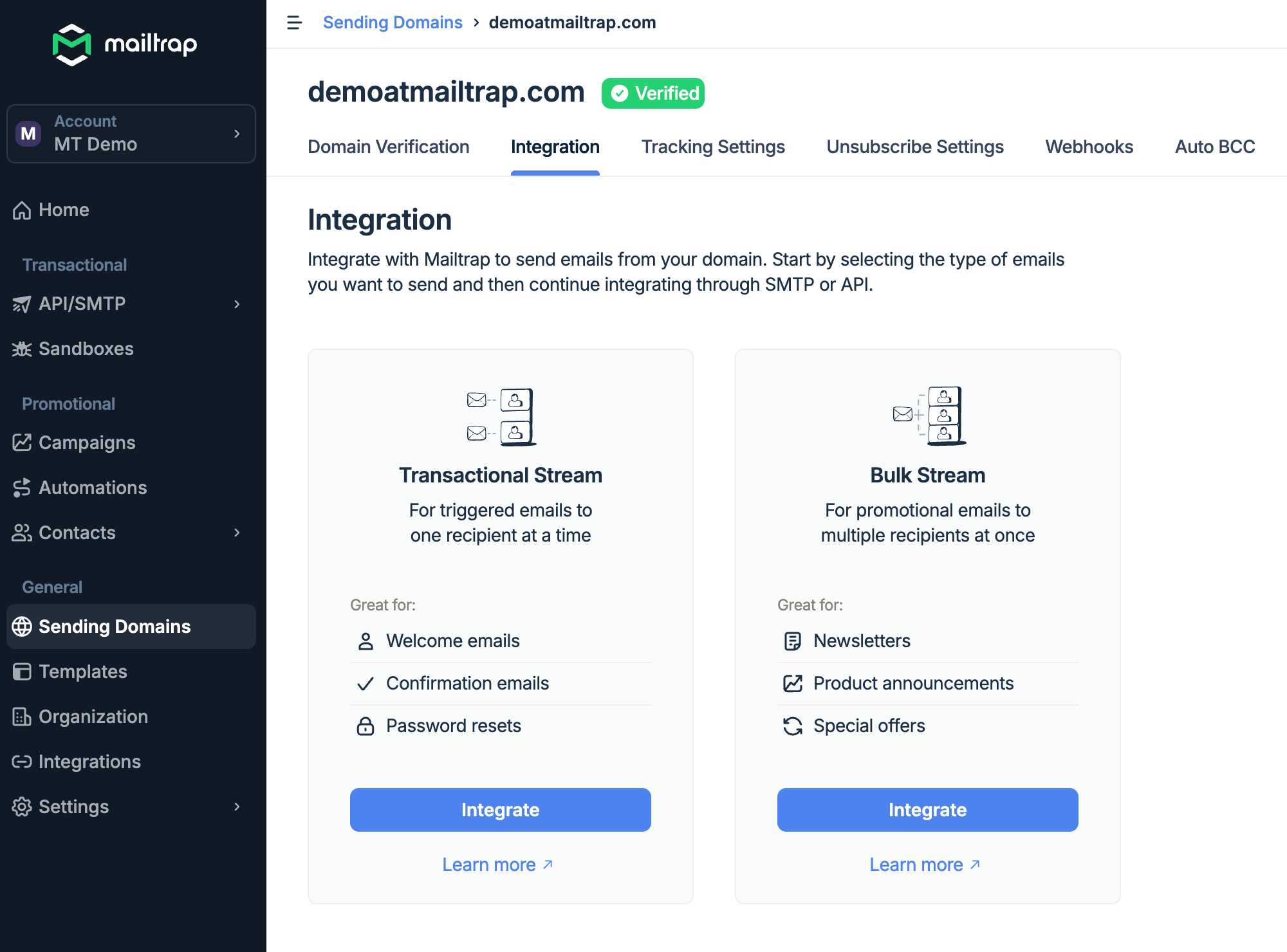
This is one area where Postmark and Mailtrap are closely aligned. Postmark separates transactional and broadcast email via Message Streams, with distinct SMTP hosts:
- Postmark:
- smtp.postmarkapp.com (transactional)
- smtp-broadcasts.postmarkapp.com (broadcast)
- Mailtrap:
- live.smtp.mailtrap.io (transactional)
- bulk.smtp.mailtrap.io (bulk)
By keeping the sending infrastructures separate, you are able to:
- Protect your transactional email reputation from the performance of your bulk campaigns
- Ensure each stream routes through the right IP pools
- Give mailbox providers the signals they need to categorize and deliver your emails correctly
Email categories
Postmark equivalent: Tags (single string per message, max 1,000 characters)
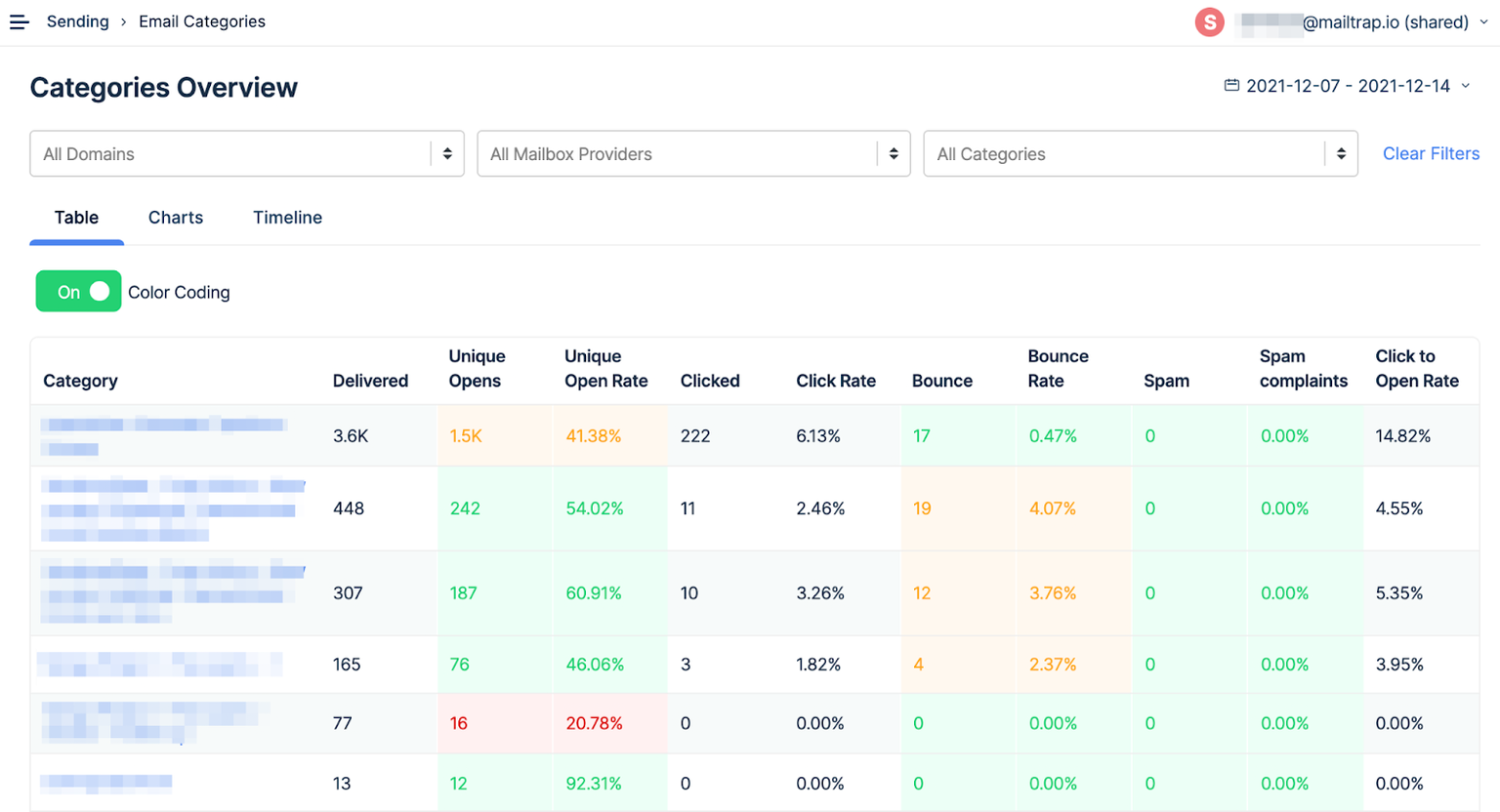
Both platforms use a single tag/category per message for grouping and analytics. Postmark uses the Tag field in the API and X-PM-Tag header in SMTP. Mailtrap Email Categories use the category field in the API and X-MT-Category header in SMTP.
Nearly identical approach; just rename the field/header.
Organization & sub-accounts
Postmark equivalent: Users and Permissions (Account Owner, Admin, Technical, Billing roles)
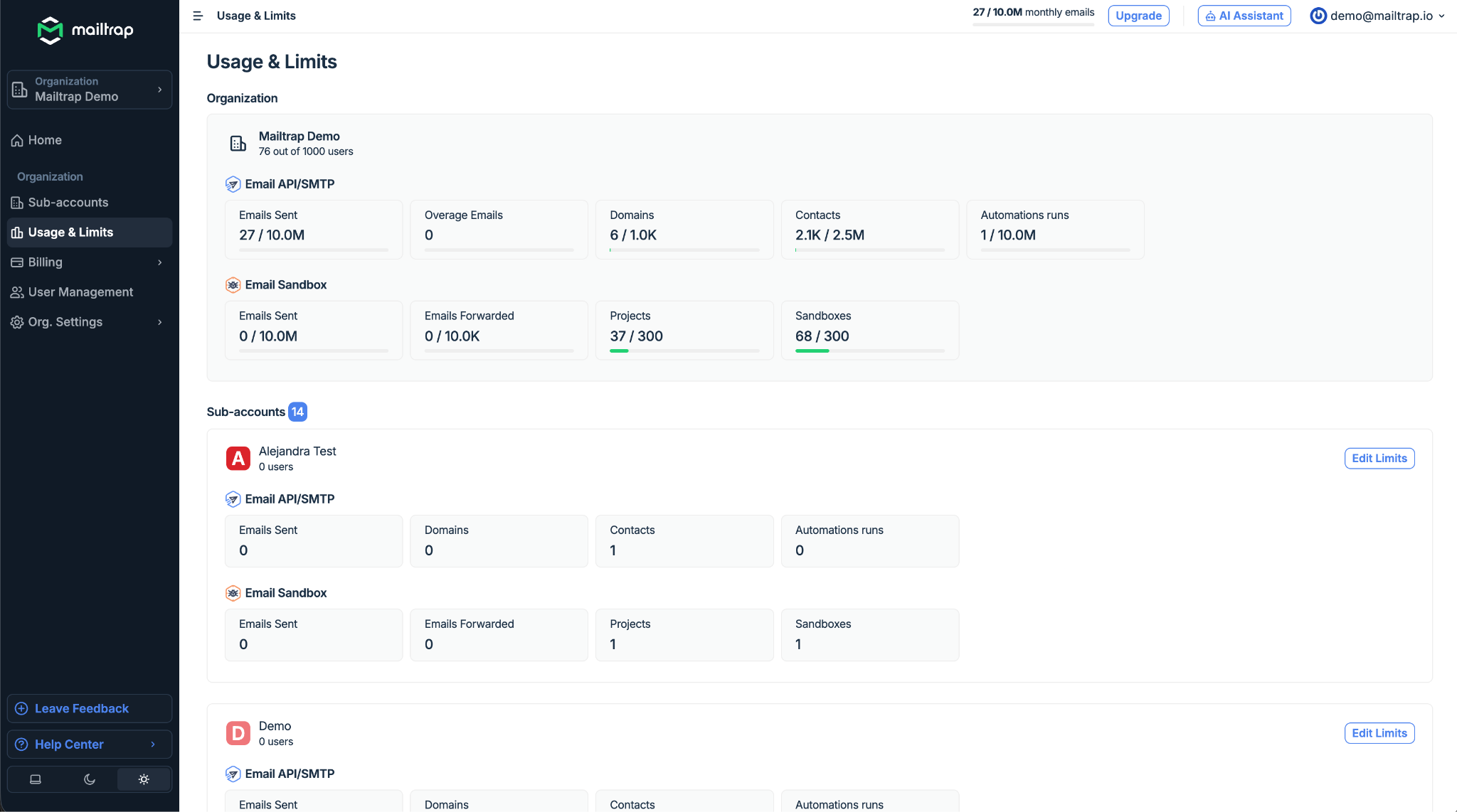
Postmark manages access through a Team system with four role types under Account settings. Mailtrap offers Organization and sub-account management from Business plan onwards.
Terminology comparison


- Domains + Sender Signatures
- Activity / Messages
- Users and Permissions
- Templates (Mustachio syntax)
- Tags
- Headers
- Metadata (key-value, searchable via API)
- Suppressions (per-message-stream)
- Message Streams
- No direct equivalent
API migration
Authentication
Both platforms use a token in a request header, but with different header names:
| Postmark | Mailtrap | |
| Method | Server API token | Bearer token |
| Header | X-Postmark-Server-Token: YOUR_SERVER_TOKEN | Authorization: Bearer YOUR_API_KEY |
| Account-level | Separate X-Postmark-Account-Token header | Same token |
Simple header rename; the auth model is conceptually the same.
API mapping
| API type | Postmark | Mailtrap | Notes |
| Transactional email | POST https://api.postmarkapp.com/email | POST https://send.api.mailtrap.io/api/send | Similar flat JSON structures |
| Bulk email | POST https://api.postmarkapp.com/email/batch | POST https://bulk.api.mailtrap.io/api/send | Both support 500 messages/batch |
| Template sending | POST https://api.postmarkapp.com/email/ with Template | POST https://send.api.mailtrap.io/api/send with template_uuid | Postmark has a dedicated template endpoint |
| Batch template sending | POST https://api.postmarkapp.com/email/batchWithTemplates | POST https://bulk.api.mailtrap.io/api/send with template_uuid | Postmark wraps in {“Messages”: […]} |
| Suppressions | GET/POST /message-streams/{stream_id}/suppressions/dump and /suppressions, /suppressions/delete | GET https://mailtrap.io/api/accounts/{account_id}/suppressions | Postmark scopes suppressions per message stream |
| Stats | GET /stats/outbound, /stats/outbound/sends, /bounces, /spam, /opens, /clicks | GET /api/accounts/{account_id}/stats, /stats/domains, /stats/categories, /stats/email_service_providers, and /stats/date | Postmark has granular stats endpoints by type |
| Email logs | GET /messages/outbound | POST /api/1.0/messages/{search,info,content}.json | Postmark supports metadata-based search (metadata_* params) |
Outbound Sending API JSON Field Mapping
| Field | Postmark | Mailtrap |
| From email | From (RFC 5322: “Name” <email>) | from.email |
| From name | Included in From string | from.name |
| To | To (comma-separated string) | to[].email |
| CC | Cc (comma-separated string) | cc[].email |
| BCC | Bcc (comma-separated string) | bcc[].email |
| Subject | Subject (max 2,000 chars) | subject |
| HTML body | HtmlBody (max 5 MB) | html |
| Text body | TextBody (max 5 MB) | text |
| Category/Tag | Tag (single string, max 1,000 chars) | category (single string) |
| Custom metadata | Metadata (key-value object, searchable) | custom_variables |
| Reply-To | ReplyTo | reply_to object |
| Custom headers | Headers[].{Name, Value} | headers |
| Template identifier | TemplateId (integer) or TemplateAlias (string) | template_uuid |
| Template variables | TemplateModel (JSON object) | template_variables (JSON object) |
| Inline CSS | InlineCss (boolean, template sends only) | Not supported – inline CSS before sending |
| Open tracking | TrackOpens (boolean) | Via account settings or headers |
| Click tracking | TrackLinks (None, HtmlAndText, HtmlOnly, TextOnly) | Via account settings or headers |
| Attachments | Attachments[].{Name, Content, ContentType}(base64) | attachments:[{content, filename, type, disposition}] (base64) |
| Inline images | Attachments[] with ContentID set | attachments:[{content, filename, type, disposition:”inline”,content_id}] |
| Message stream | MessageStream (e.g., “outbound”, “broadcast”) | Determined by endpoint: send.api (transactional) vs bulk.api (bulk) |
Code snippets
-
 cURL
cURL

 Postmark
curl -X POST https://api.postmarkapp.com/email \
-H "X-Postmark-Server-Token: YOUR_SERVER_TOKEN" \
-H "Content-Type: application/json" \
-d '{
"From": "Sender Name <sender@yourdomain.com>",
"To": "Recipient Name <recipient@example.com>",
"Subject": "Welcome aboard",
"HtmlBody": "<h1>Hello</h1><p>Welcome to the platform.</p>",
"TextBody": "Hello. Welcome to the platform.",
"Tag": "welcome",
"TrackOpens": true,
"TrackLinks": "HtmlAndText",
"MessageStream": "outbound"
}' Mailtrap
Copy
curl -X POST https://send.api.mailtrap.io/api/send \
  -H "Authorization: Bearer YOUR_API_KEY" \
  -H "Content-Type: application/json" \
  -d '{
    "from": {
      "email": "sender@yourdomain.com",
      "name": "Sender Name"
    },
    "to": [
      {
        "email": "recipient@example.com",
        "name": "Recipient Name"
      }
    ],
    "subject": "Welcome aboard",
    "html": "<h1>Hello</h1><p>Welcome to the platform.</p>",
    "text": "Hello. Welcome to the platform.",
    "category": "welcome"
}'Note: Postmark uses PascalCase field names (HtmlBody, TextBody) and comma-separated recipient strings. Mailtrap uses snake_case/lowercase fields and recipient arrays with separate email/name properties. Both use flat JSON – no deep nesting.
SMTP migration
| Setting | Postmark (Transactional) | Postmark (Broadcast) | Mailtrap (Transactional) | Mailtrap (Bulk) |
| Host | smtp.postmarkapp.com | smtp-broadcasts.postmarkapp.com | live.smtp.mailtrap.io | bulk.smtp.mailtrap.io |
| Port | 587, 25, 2525 | 587, 25, 2525 | 587 (recommended), 25, 2525 | 587 (recommended), 25, 2525 |
| TLS | API (HTTPS) – Required SMTP – Required Outbound to Recipients – Opportunistic TLS | API (HTTPS) – Required SMTP – Required Outbound to Recipients – Opportunistic TLS | Required (STARTTLS) | Required (STARTTLS) |
| Auth method | CRAM-MD5, DIGEST-MD5, PLAIN, LOGIN | CRAM-MD5, DIGEST-MD5, PLAIN, LOGIN | PLAIN, LOGIN | PLAIN, LOGIN |
| Username | Server API Token | Server API Token | api (literal string) | api (literal string) |
| Password | Server API Token (same as username) | Server API Token | API token | API token |
Migration notes:
- Host swap: Both platforms separate transactional and bulk/broadcast into distinct SMTP hosts. Replace
smtp.postmarkapp.com→live.smtp.mailtrap.ioandsmtp-broadcasts.postmarkapp.com→bulk.smtp.mailtrap.io. - Username: Postmark uses the Server API Token as both username and password. Mailtrap uses the literal string
apias username and the API token as password. - Ports: Same on both sides – 587, 25, 2525. No port changes needed.
- SMTP headers: Replace
X-PM-Tag→X-MT-Category,X-PM-Metadata-*→X-MT-Custom-Variables, andX-PM-Message-Stream→ use the appropriate Mailtrap SMTP host instead.
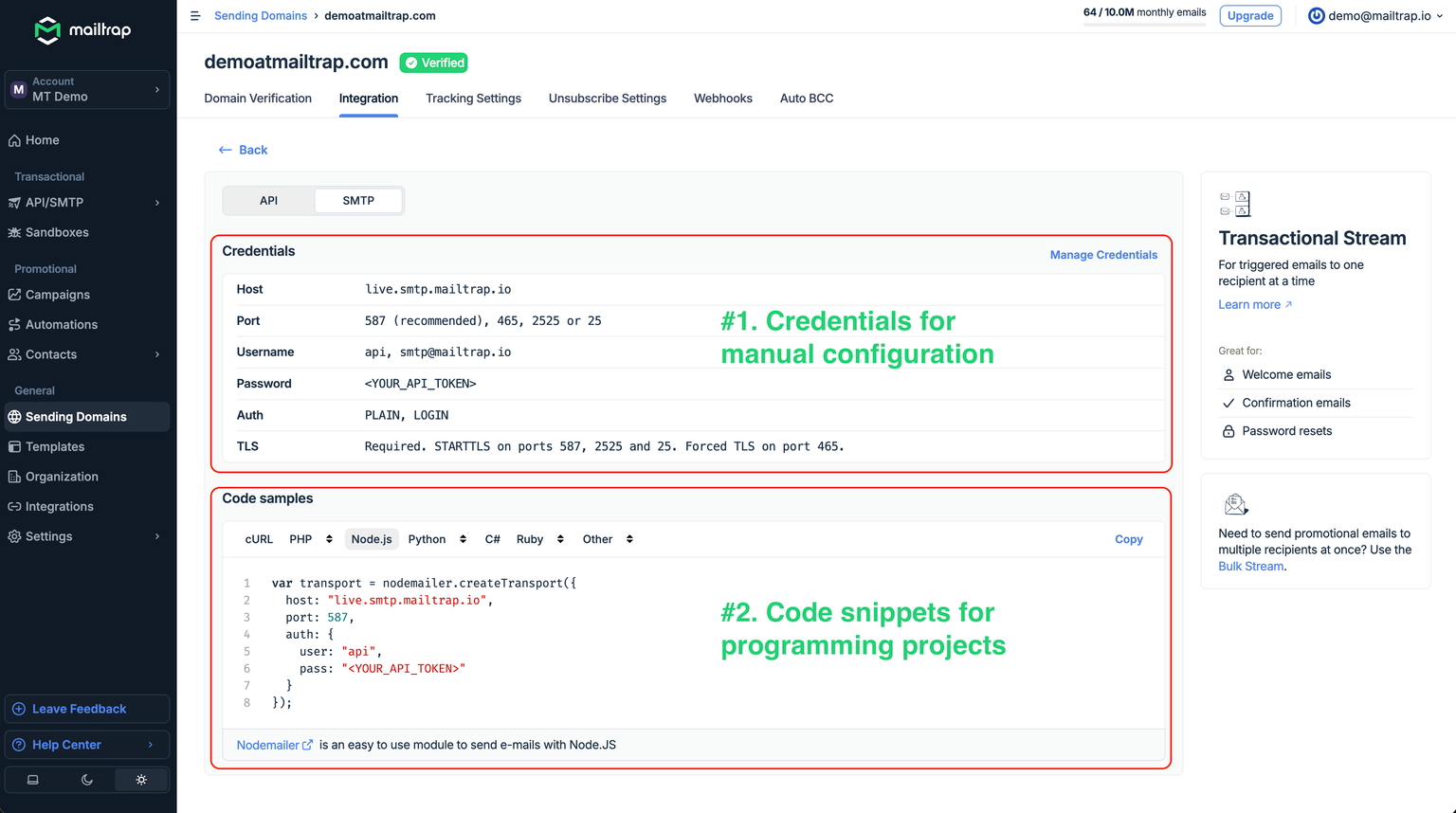
For more information on migrating your SMTP configuration, click this link. ⬅️
Rate limits & quotas
| Limit | Postmark | Mailtrap |
| API rate limit | No published hard limit (returns 429 on excess) | 150 requests per 10 seconds per API token |
| Batch size | 500 messages per batch call (50 MB payload max) | 500 emails per batch call |
| Message size | 10 MB (including attachments) | 10 MB default (extendable to 30 MB on request) |
| Max recipients per send | 50 (To + CC + BCC combined) | Not publicly specified |
| Templates per server | 100 max | 200 max |
| Message streams | Up to 10 per server | Transactional + Bulk (fixed) |
Email templates
Postmark uses Mustachio (a Mustache-inspired engine). Mailtrap uses Handlebars. The syntax is similar but not identical – you’ll need to review templates during migration.
Syntax comparison
| Pattern | Postmark (Mustachio) | Mailtrap (Handlebars) |
| Variable insertion | {{variable_name}} | {{variable_name}} |
| Nested access | {{person.first_name}} | {{person.first_name}} |
| Conditionals | {{#var}}…{{/var}}(truthy check) | {{#if var}}…{{else}}…{{/if}} |
| Inverted/fallback | {{^var}}default{{/var}} | {{#if var}}{{var}}{{else}}default{{/if}} |
| Iteration | {{#each items}}…{{/each}} | {{#each items}}…{{/each}} |
| Raw HTML (unescaped) | {{{variable}}}or {{&variable}} | {{{variable}}} |
| Date formatting | Not supported – format before passing | Not supported – format before passing |
| Pass variables via API | TemplateModel (JSON object) | template_variables (JSON object) |
| Template identifier | TemplateId (integer) or TemplateAlias (string) | template_uuid |
| Inline CSS | InlineCss: true (template sends only) | Not supported – inline before sending |
Migration notes:
- Variables and loops transfer directly – same
{{var}}and{{#each}}syntax. - Conditionals need attention: Postmark uses
{{#var}}...{{/var}}for truthy checks. Mailtrap Handlebars uses{{#if var}}...{{/if}}. Similarly, Postmark’s{{^var}}...{{/var}}becomes{{else}}blocks in Handlebars. - Variable passing is almost identical – both use a JSON object. Just rename the field from
TemplateModeltotemplate_variables. - Inline CSS: If you rely on Postmark’s
InlineCssflag, you’ll need to inline CSS in your HTML before sending through Mailtrap, or use a build-step tool likejuiceto handle it.

Frequently Asked Questions
-
Do I need to re-verify my domain if I’ve already set it up in Postmark?
Yes, you’ll need to re-verify your domain. See the Mailtrap Knowledge Base for up-to-date guidance.
-
Why does Mailtrap have two separate SMTP hosts?
Mailtrap separates transactional and bulk streams to protect your sender reputation and ensure proper delivery routing for each email type. Postmark does the same with Message Streams – you’re already familiar with this pattern.
-
Does Mailtrap offer migration assistance?
Yes, Mailtrap offers migration assistance from Business plan onwards.
-
How do I migrate templates from Postmark?
Both use Mustache-family syntax, so most template markup transfers with minor edits. Convert Postmark conditionals (
{{#var}}...{{/var}}) to Handlebars ({{#if var}}...{{/if}}). Update API calls to usetemplate_uuidinstead ofTemplateId/TemplateAlias, and pass variables viatemplate_variablesinstead ofTemplateModel. -
What about Postmark’s Metadata search?
Postmark lets you search messages by metadata key-value pairs (
metadata_*query params). Mailtrap’s Email Logs provide filtering capabilities – check the current API docs for equivalent search options. -
Can I migrate gradually?
Yes. If you’re on Rails, Mailtrap’s ActionMailer Balancer lets you split traffic proportionally (e.g., 80% Postmark / 20% Mailtrap) and shift over time. For other frameworks, route by email type – move transactional first, then bulk.