Key takeaways:
- One product covering a 1+ billion contact B2B database, multichannel sequences (email, LinkedIn, calls, SMS, WhatsApp), AI personalization, and built-in deliverability. 4.6/5 on G2 across roughly 1,500 reviews.
- The AI layer is the real differentiator: AI Variables for personalization at scale and Jason AI SDR for autonomous prospecting, with customer reply rates of 60 to 65%.
- Pricing starts at $49/user/month email-only and $89/user/month for the Multichannel plan. Best fit for SDR teams, agencies, and founders running multichannel outbound.
Sales outreach in 2026 looks nothing like it did three years ago. Inboxes are noisier, prospects are pickier, and the gap between teams that book meetings and teams that get ghosted keeps widening. Most of that gap comes down to two things: the quality of your data, and how well you string emails, calls, LinkedIn touches, and follow-ups together without sounding like a bot.
Reply.io has been chipping away at that exact problem for over a decade. In this Reply.io review, we’ll cover what the platform actually does in 2026, who it fits, what it costs, and where it has limits worth knowing before you commit.
What is Reply.io?
Reply.io is an AI-powered sales engagement platform built for outbound and inbound sales teams. Its job is to help you find the right prospects, reach out across multiple channels, and book meetings without burning anyone out on the way.
In practice, the platform stitches four pillars into one workflow:
- A B2B contact database with over 1 billion contacts and 60 million accounts across 150+ countries, powered by Real-Time Data Search by Generect.
- Multichannel sequences that span email, LinkedIn, WhatsApp, calls, and SMS in a single cadence.
- AI personalization through AI Variables and AI-Generated Sequences.
- A deliverability stack that includes unlimited mailboxes, MailToaster.ai warm-up, Email Health Checker, and Google Postmaster integration.
More than 3,000 companies use Reply.io, and the platform holds a 4.6/5 rating across roughly 1,500 G2 reviews.
Who is Reply.io best suited for in 2026?
Reply.io fits teams whose pipeline depends on consistent, high-volume outbound that still feels personal. It works well for:
- SDR and BDR teams running daily multichannel cadences against named account lists.
- Founders doing their own outbound before hiring a sales team.
- Lead-generation agencies running parallel campaigns for many clients in one platform.
- Recruiters sourcing candidates through cold email and LinkedIn at the same time.
- PR and link-building teams managing structured outreach at scale.
- Account-based selling teams blending email, calls, and LinkedIn for tight target lists.
On the other hand, it’s a less natural fit for marketing-first teams that need behavioral segmentation, deep marketing automation, or transactional email infrastructure. That’s a different problem and calls for a different category of tool. If your main concern is delivering password resets, receipts, or product notifications reliably, you’re looking at email API platforms, not sales engagement.
Reply.io’s main features in 2026
Reply.io packs a lot under one roof, and here’s what stands out, feature by feature.
Audience discovery and Reply Data
Reply Data is the in-app B2B database with 1+ billion contacts and around 60 million accounts. You can filter by job title, industry, geography, headcount, tech stack, and intent signals.
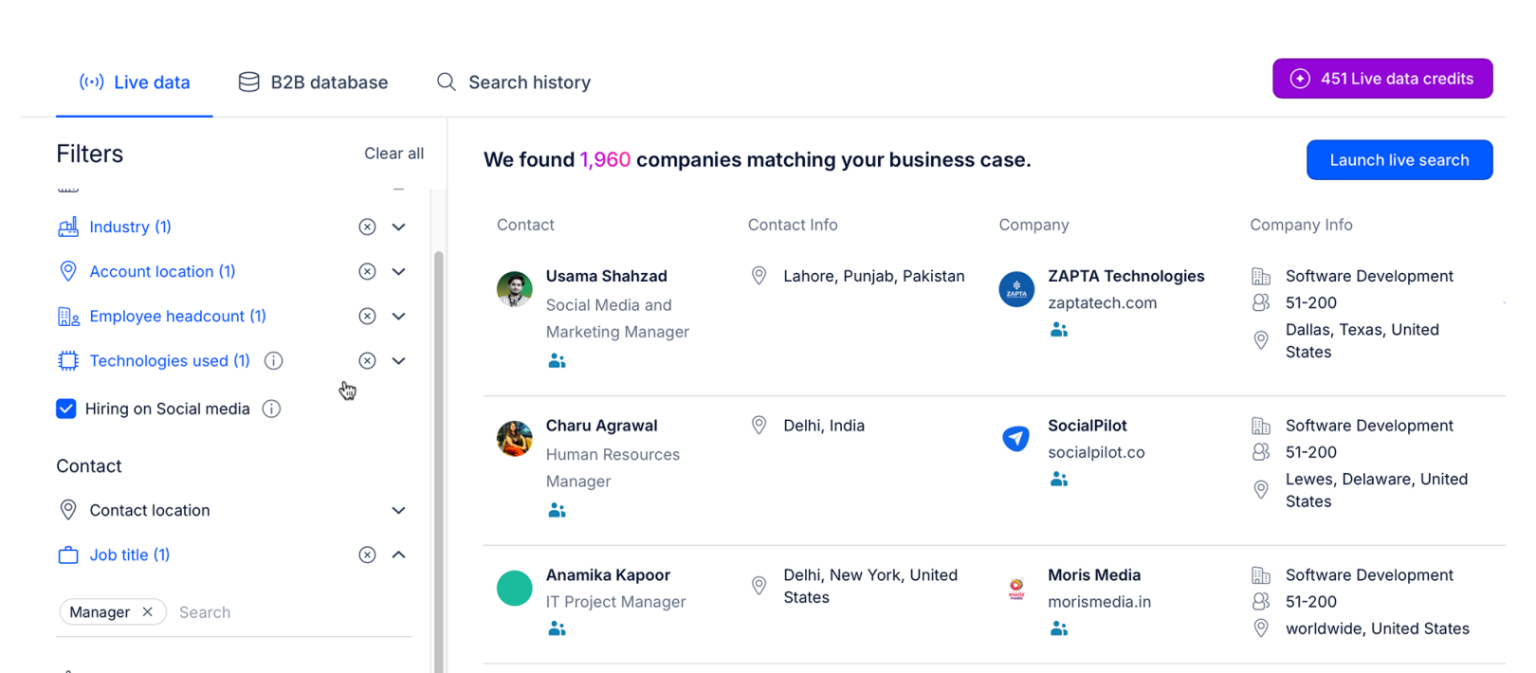
Smart Audience Suggestions speeds the process up by recommending lookalike prospects based on your best customers. The Findy Chrome extension also lets you pull verified emails and phone numbers straight from LinkedIn while you browse.
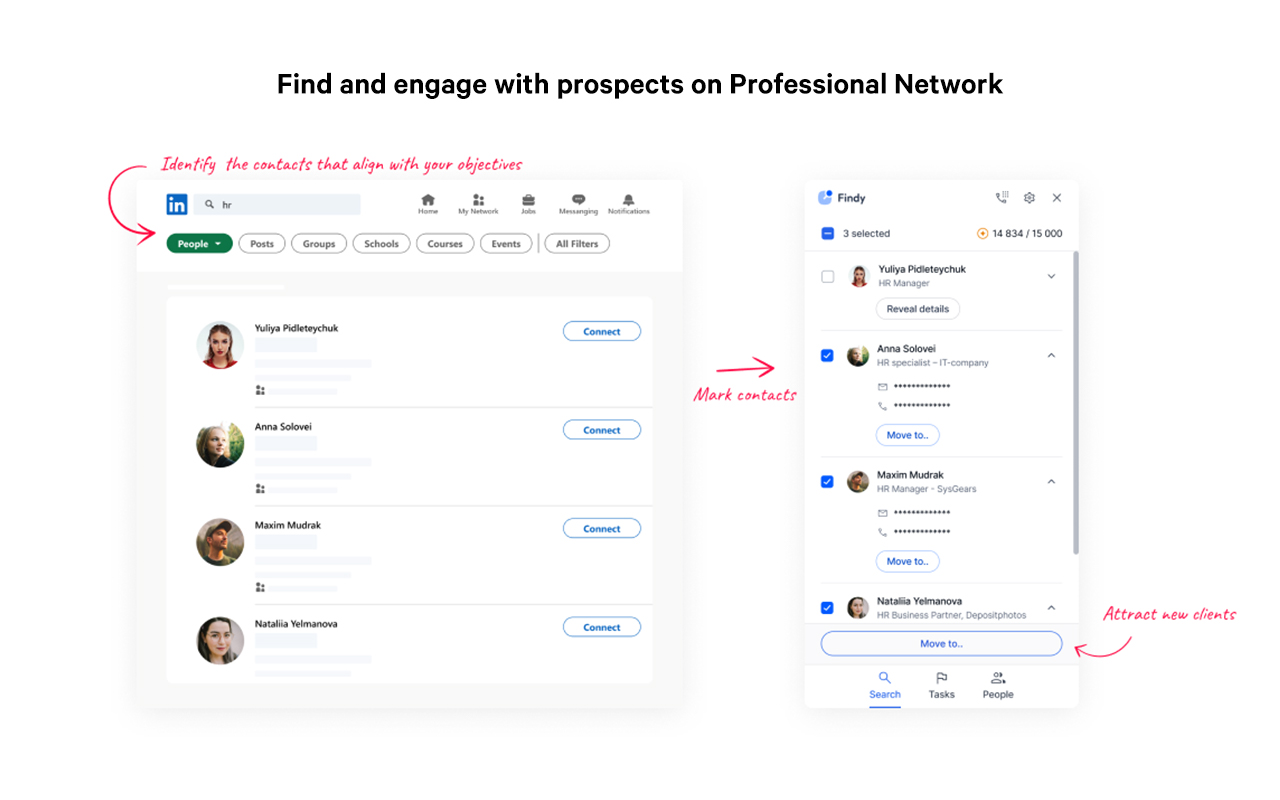
The practical upside is that you don’t need a separate data tool sitting next to your sequencer. List-building lives in the same place as the outreach, which means fewer copy-pastes and fewer broken syncs.
Multichannel conditional sequences
This is the part Reply.io is best known for, and it’s the reason most teams pick it. You can build a sequence that sends a personalized email on day one, follows up with a LinkedIn connection request on day three, queues a manual call task on day five, drops a WhatsApp message on day seven, and so on. Every step can branch based on whether the prospect opened, replied, or clicked.
AI Variables and AI-Generated Sequences
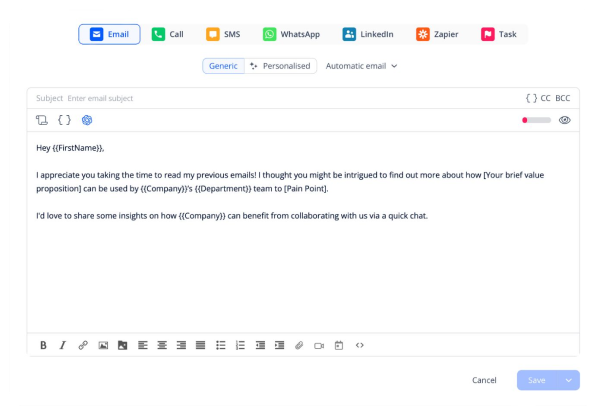
AI Variables is Reply.io’s take on personalization at scale.
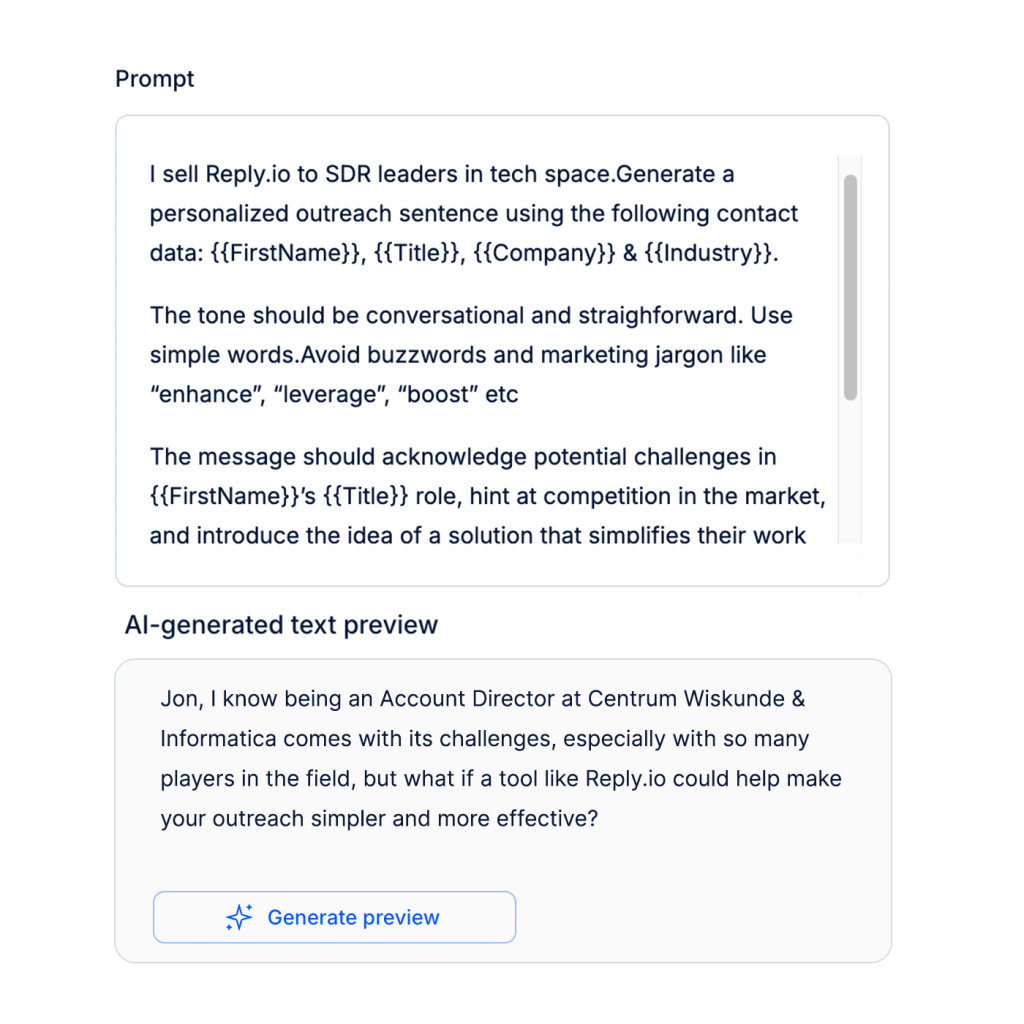
Instead of writing static {first_name} merge fields, you write a prompt like “compliment one specific line from their last LinkedIn post” and the platform fills it in for every prospect on the list. AI-Generated Sequences will also draft a multi-step cadence from a short brief about your offer and ICP.
It’s not magic, and you still review the output. Even so, it cuts the busywork that used to eat half a rep’s morning.
Jason AI SDR
Jason is Reply.io’s autonomous AI SDR agent.
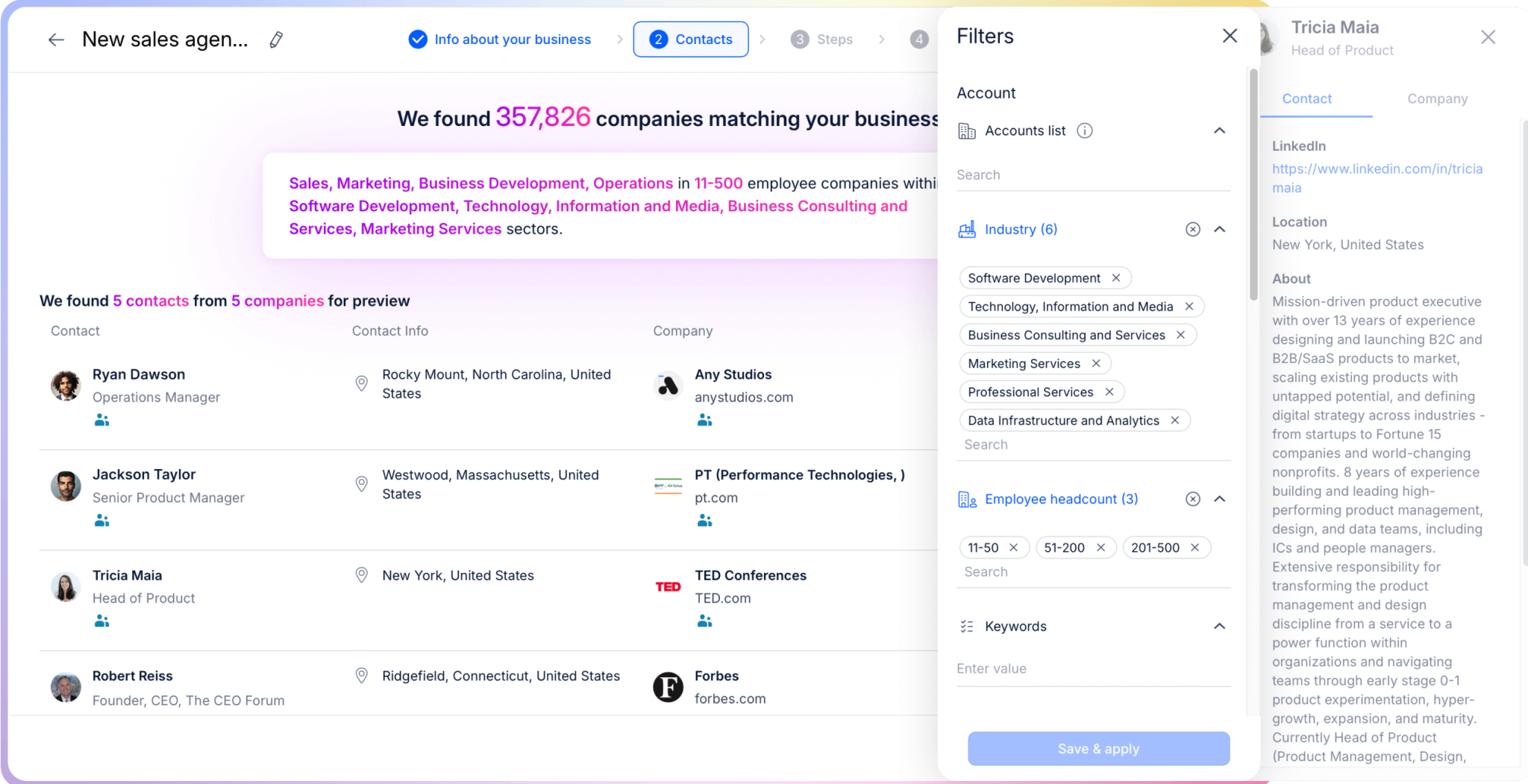
You give it an ICP, a value proposition, and a set of intent signals to watch. From there, Jason works in two modes:
- Autopilot, where it sources prospects, builds sequences, sends messages, handles replies, and books meetings on its own.
- Copilot, where it drafts every step and waits for your approval before sending.
This is one of the more developed agentic SDR products on the market right now.
Email deliverability kit
Sales engagement tools often leave deliverability to third parties. Reply.io takes a different route and bakes the stack into the same product:
- Unlimited mailboxes under a fair-use policy, so you can split sending across many domains without paying per inbox.
- MailToaster.ai automatic warm-up at no extra cost.
- Email Health Checker for ongoing monitoring of sender reputation.
- Google Postmaster integration so you can see how Gmail itself is rating you.
- Built-in email validation to filter risky addresses before they hurt your bounce rate.
Reply.io reports a 98% delivery rate across the platform. That’s not a vanity number when your sequence depends on touching the same prospect five or six times.
Reports and analytics
Per-sequence dashboards show open, reply, click, opt-out, and meeting-booked rates. Team-level views compare reps, sequences, and channels side by side. You can see which subject lines, opening lines, or step orders convert best, then clone the winners.
For agencies, the consolidated inbox and per-client workspaces keep accounts cleanly separated, which is harder to find than it sounds.
How to get started with Reply.io
Onboarding is straightforward. Here’s the path most teams follow.
- Start the 14-day free trial at reply.io. No credit card needed.
- Connect a mailbox through Gmail API, Microsoft Graph API, or generic SMTP.
- Authenticate your sending domain through SPF, DKIM, and DMARC. This is the one step that takes real attention, but you only do it once.
- Add a few seed contacts or run an Audience Discovery search to build your first list.
- Either build a sequence step by step, or hand a short brief to AI-Generated Sequences and review the draft.
- Turn on MailToaster.ai warm-up and let it run for two weeks before you scale volume.
By the end of week two, most teams are running their first full multichannel cadence. Annual customers also get CSM onboarding included, which speeds things up further if you’d rather not figure it out on your own.
What Reply.io gets right
A few things stand out once you’ve actually lived in the platform for a while.
The first is breadth. You don’t have to glue Reply.io together with three or four other tools to do real outbound. Data, sequences, AI personalization, calls, LinkedIn, deliverability, and analytics all live in one place. Fewer integrations means fewer things to break.
The second is the AI layer. AI Variables and Jason are not gimmicks bolted on to look modern in a roadmap deck. They cut hours of manual work per rep per week, and the customer results back this up. A 60-65% reply rate is hard to argue with.
Beyond that, the deliverability stack is unusually deep for a sales engagement tool. Most competitors push warm-up and Postmaster integration to third-party add-ons. Reply.io builds them into the same product, which means fewer moving parts when something starts going to spam at 9pm on a Friday.
Finally, the support and onboarding match the price tag. Live chat responds in under 15 minutes during business hours, and annual customers get a dedicated CSM rolling out playbooks and best practices.
Where Reply.io falls short
A few things are also worth flagging honestly, since this is a review and not a brochure.
The learning curve is real. The first time you open the sequence builder, the number of step types, branching options, and AI fields can feel like a lot. Most teams need a few sessions before they feel fluent. Once you’re past that, it’s fine, but expect a week or two of friction.
The UI also shows its age in places. Reply.io is more than 10 years old, and parts of the interface haven’t been refreshed at the same pace as the new AI features. Functional, just not the slickest thing on the block.
On top of that, LinkedIn and Calls/SMS are paid add-ons on the standard email plan, at $69 per month and $29 per month per account respectively. The Multichannel plan at $89 per user per month bundles them in instead. Still, if you start on the cheap email-only plan and bolt channels on later, the costs creep up faster than you might budget for.
Lastly, Jason AI SDR pricing is firmly upmarket. Starter Jason is $500 per month on annual billing, or $800 per month on monthly billing. The Growth tier sits in the $1,500 to $3,000 per month range. Powerful, but not where most early-stage teams should start.
How much does Reply.io cost in 2026?
Pricing scales with the number of contacts you work with and the channels you want active. The free trial covers 14 days with no card required, and annual billing knocks up to 17% off.
| Plan | Starting price | Best for | Key inclusions |
| Email Volume | From $49/user/month (1,000 contacts) | Email-only outbound, single-rep teams | Unlimited emails, unlimited mailboxes (fair-use), 50 live data credits/month, MailToaster.ai warm-up, anti-spam suite |
| Multichannel | $89/user/month (annual) | Most modern sales teams | Everything in email plus LinkedIn, calls, SMS, WhatsApp, 200 visitor reveals/month, 5 to 10 mailboxes per user |
| Jason AI SDR Starter | From $500/month (annual) | Lean teams adding an AI SDR | Autopilot or copilot mode, 1,000 to 3,000 contacts, intent signals, unlimited mailboxes, CSM onboarding |
| Jason AI SDR Growth | From $1,500/month (annual) | Scaling outbound with white-glove setup | 5,000 to 10,000 contacts, dedicated Slack channel, custom playbooks |
| Agency Core | From $210/month | Agencies running clients in parallel | Multi-workspace, unlimited clients and users, white-label option, consolidated inbox |
| Agency AI SDR | From $500/month per client | Agencies offering AI SDR as a service | Everything in Core plus AI hyper-personalization, custom playbooks, fully autonomous or approval mode |
Two add-ons worth budgeting for if you start on the email-only plan: LinkedIn automation at $69 per month per account and Calls/SMS at $29 per month per account. If you know you’ll need both, the Multichannel plan usually pays for itself fast.
Reply.io vs. the alternatives
A few names you’ll likely consider next to Reply.io:
- Outreach is the enterprise standard with strong revenue intelligence and forecasting. Pricing typically lands well above Reply.io, and onboarding takes longer.
- Salesloft is similar in scope to Outreach, with a tighter focus on cadence governance and rep coaching. Again, priced for larger sales orgs.
- Apollo.io combines a B2B database with sequencing, popular as a cheaper all-in-one. The data side is competitive, but the AI layer and deliverability features feel thinner.
- Lemlist focuses on creative cold email with image and video personalization. Good for solo founders and small teams, less suited to agencies or enterprise multichannel.
- Instantly is built around high-volume cold email at low cost. Works for affiliate-style outbound, but lacks Reply.io’s CRM-grade workflow features.
- Skylead combines LinkedIn automation and cold email with prospecting, AI data enrichment, and an AI SDR. Good for agencies and sales teams that want a more affordable outbound tool with unlimited email accounts and inbox rotation, less suited to teams that need built-in calls.
Put differently, if you want one tool that handles list-building, multichannel orchestration, AI-driven personalization, deliverability, and (optionally) an autonomous AI SDR, Reply.io is one of the more complete options in the group. If you only need cheap email-only sending or only need an enterprise-grade revenue platform, you have lighter or heavier options to consider.
Is Reply.io worth it in 2026?
For sales teams whose pipeline depends on consistent multichannel outbound, yes. The breadth of channels, the data layer, and the AI tooling are all rare to find in one product at this price point. A 4.6/5 rating across nearly 1,500 G2 reviews is not an accident, and the customer numbers from Belkins, pr.co, and Business Radio X tell the same story from a different angle.
It’s a strong fit when:
- Your team runs cold email plus LinkedIn or calls every week.
- You need a B2B database without paying a separate data vendor.
- You want AI personalization that actually shortens reps’ days, not just decorates them.
- You run agency-style outreach across many client accounts.
It’s less of a fit when:
- Your outreach is mostly inbound nurture and lifecycle email.
- A tightly defined CRM workflow already covers your sequencing.
- Your budget is closer to free or near-free cold email tooling.
If you fit the first list more than the second, the 14-day free trial is the cheapest possible way to find out whether the platform earns a slot in your stack. Head to reply.io to start one or book a demo with their team.
A quick note on stacks before we wrap. Reply.io is a sales engagement platform, not a transactional email API. Those are two different jobs. If your product also sends password resets, receipts, and verification emails, you’ll want a dedicated transactional sender handling that side of things while Reply.io runs the outbound campaigns. The two can sit side by side in the same stack without stepping on each other.
Frequently asked questions
Does Reply.io include a B2B contact database?
Yes. Reply Data, powered by Real-Time Data Search by Generect, gives you 1+ billion contacts and 60 million accounts across 150+ countries. You can search by role, industry, geography, headcount, tech stack, and intent signals.
Does Reply.io support LinkedIn automation?
Yes, on the Multichannel plan and as a $69 per month per account add-on on the standard email plan. You can send connection requests, messages, InMails, voice messages, and engage with prospect posts on autopilot.
How does Reply.io handle email deliverability?
Through unlimited mailboxes under fair-use, free MailToaster.ai warm-up, an Email Health Checker, and Google Postmaster integration. Reply.io reports a 98% overall delivery rate across the platform.
What is Jason AI SDR?
Jason is Reply.io’s autonomous AI SDR agent. It works in autopilot or copilot mode, sourcing prospects, drafting and sending sequences, and booking meetings. Pricing starts at $500 per month on annual billing for the Starter tier.
Is there a free trial?
Yes. Reply.io offers a 14-day free trial with no credit card needed. It includes the B2B database, multichannel sequences, reports, API access, and integrations with Salesforce, HubSpot, Pipedrive, and others.
How does Reply.io price compare for small teams?
The Email Volume plan starts at $49 per user per month for 1,000 active contacts, which is accessible for solo founders or two-person teams. The Multichannel plan at $89 per user per month is usually the right call once you add LinkedIn, calls, or SMS to the mix.